

Creating a SaaS Offer in Microsoft Marketplace
Publishing a SaaS offer in Microsoft Marketplace (formerly the Microsoft commercial marketplace, spanning Azure Marketplace and Microsoft AppSource) puts your SaaS application in front of enterprise buyers who already procure solutions through Microsoft. It simplifies procurement, improves discoverability, and, for transactable offers, enables Microsoft to facilitate billing and commerce. Creating a Microsoft Marketplace SaaS offer is a structured process that includes business onboarding, listing creation, technical integration, and certification. With proper planning, the Microsoft Partner Center workflow becomes straightforward and efficient.
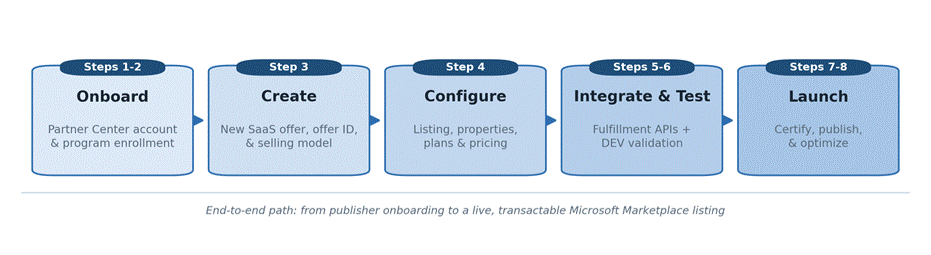
- Set up the publisher account
Create or sign in to a Microsoft Partner Center account and enroll in the Microsoft Marketplace program. Complete the publisher onboarding requirements, including your business profile, tax details, payout information, and identity verification. Publishing a SaaS application on Azure Marketplace or Microsoft AppSource is only possible after onboarding is complete.
Microsoft Partner Center is where you create, configure, submit, manage, and monitor your Microsoft Marketplace SaaS offers while accessing analytics and marketplace insights.
- Plan the offer and register the app
Choose the Microsoft Marketplace listing option early because it determines the technical and business requirements that follow.
- Contact Me: A simple listing for lead generation with no technical requirements.
- Free Trial: Evaluation access for a trial hosted outside Microsoft Marketplace.
- Get It Now: Direct access to a paid, free, or BYOL solution.
- Sell through Microsoft: A fully transactable Microsoft Marketplace SaaS offer where Microsoft manages billing and commerce.
For a transactable SaaS offer, register your application in Microsoft Entra ID and capture the Tenant ID (Directory ID) and Application (Client) ID. These identifiers are required when integrating the SaaS Fulfillment API. Plan the landing page and webhook endpoint early, as both are essential for subscription provisioning and lifecycle management.
- Create the offer in Partner Center
From the Home page in Microsoft Partner Center, select Marketplace offers, then choose + New Offer > Software as a Service.
Enter the following information:
- Offer ID: A unique identifier using lowercase letters and numbers only (maximum 50 characters). This becomes part of the Microsoft Marketplace listing URL and cannot be changed after creation.
- Offer Alias: An internal name used within Partner Center that also cannot be modified after creation.
On the Offer Setup tab, decide whether to Sell through Microsoft or manage transactions independently. You can also connect customer leads to CRM platforms such as Dynamics 365, Salesforce, Marketo, Azure Table Storage, or an HTTPS endpoint.
- Build the listing, properties, and plans
- Properties: Select up to two categories and, optionally, industries. Accept the Standard Contract for Microsoft Marketplace or provide custom terms.
- Listing: Add the product name, summary, short and long descriptions, and search keywords that improve visibility in Microsoft Marketplace, Azure Marketplace, and Microsoft AppSource. Include support and privacy policy links. Upload a high-quality PNG logo and between one and five screenshots.
A well-optimized Microsoft Marketplace listing clearly explains who the solution is for, the business challenges it solves, and what makes it different from competing SaaS applications.
- Plans and Pricing: Define at least one pricing plan, such as Basic, Professional, or Enterprise. Each plan uses a single pricing model (flat-rate or per-user), and all plans within the same offer must share that pricing structure. Configure monthly or annual billing, add usage-based billing through the Marketplace Metering Service, and use private plans or private offers for enterprise customers when needed.
- Implement the SaaS fulfillment integration
For transactable offers, integrate the SaaS Fulfillment API (v2) so Microsoft Marketplace can manage the complete subscription lifecycle, including activation, plan changes, quantity updates, suspension, reinstatement, and cancellation.
The integration should work alongside the landing page, where customers authenticate and activate subscriptions, and the webhook endpoint that receives subscription lifecycle notifications. To accelerate implementation, consider using the Commercial Marketplace SaaS Accelerator as a reference architecture.
- Test the end-to-end customer flow
Create a separate development (DEV) offer and validate every stage of the customer journey before publishing your Microsoft Marketplace SaaS offer.
Test:
- Purchase experience
- Landing page
- User authentication
- Subscription activation
- Customer provisioning
- Billing behavior
- Plan upgrades and downgrades
- Subscription cancellation
- Customer notifications
Comprehensive testing helps reduce Microsoft Marketplace certification delays while delivering a better customer experience.
- Submitfor certification
Submit your production (PROD) offer for Microsoft Marketplace certification. Microsoft reviews marketplace policies, technical configuration, listing quality, security requirements, and customer experience before approving the SaaS application. After successful validation, the offer proceeds through the publisher sign-off process.
- Preview, publish, andoptimize
Use preview links to validate the acquisition experience before making the offer publicly available. When everything is ready, select Go Live to publish your Microsoft Marketplace SaaS offer.
After launch, continuously monitor:
- Customer leads
- Conversions
- Customer feedback
- Plan adoption
- Marketplace analytics
Regularly optimize your Microsoft Marketplace listing, pricing strategy, onboarding process, and product messaging to improve discoverability and increase conversions.
Bottom line
When creating a SaaS offer in Microsoft Marketplace, plan the listing option and technical architecture early. Register the application in Microsoft Entra ID, integrate the SaaS Fulfillment API, configure the landing page and webhook, and prepare the Microsoft Marketplace listing before submission. With these foundations in place, the remaining Microsoft Partner Center workflow becomes a structured publishing process that helps you successfully launch and grow your SaaS application in Azure Marketplace and Microsoft AppSource.
Categories
- Accessibility solutions (3)
- AI / LLMOps (AI Observability & Monitoring) (3)
- AI & Automation (17)
- AI Governance & Responsible AI (4)
- AI Security (4)
- Android (17)
- Angular JS (1)
- API & Integration / Developer Tools (1)
- Apple (3)
- Artificial Intelligence (1)
- Artificial Intelligence (AI) (16)
- AV & Collaboration Technology (2)
- AWS Cloud Computing (2)
- AWS DMS (6)
- AWS RDS (12)
- Azure (3)
- BI & ANALYTICS (16)
- Cloud Computing & AI (5)
- Cloud Identity & Directory Services (1)
- Cloud Migration (12)
- Cloud Security & Identity Management (3)
- Company News (5)
- Continuous integration and continuous deployment (2)
- Cybersecurity (7)
- Data Analytics (12)
- Data Engineering (8)
- Data Governance & Compliance (6)
- Data Management (5)
- Data Migration (9)
- Data Quality (1)
- Data Quality & Data Governance (1)
- DBA (10)
- DevOps (1)
- Email Security (1)
- Endpoint Management / Device Management (1)
- Enterprise AI / AI Governance (1)
- Enterprise AI / AI Implementation Best Practices (1)
- Enterprise AI & Intelligent Automation (2)
- Enterprise Mobility & Security (1)
- Enterprise Software Integration / Backend Development (1)
- Enterprise Technology (1)
- Enterprise UX/UI Design (1)
- Goldengate (19)
- Google (2)
- Hadoop (3)
- HPNA (1)
- Ios (10)
- ios 10 (2)
- iPad (3)
- iPhone (3)
- Licensing (7)
- Linux (13)
- Machine Learning Solutions (1)
- Marketing Technology (1)
- Microsoft 365 (1)
- Microsoft 365 Development / APIs (1)
- Microsoft 365 Security & Compliance (4)
- Microsoft Configuration Manager (SCCM / MECM) (1)
- Microsoft Dynamics 365 (4)
- Microsoft Marketplace (1)
- Microsoft Office (5)
- Microsoft Purview (3)
- Microsoft SharePoint & Security (1)
- Microsoft Teams / Collaboration Tools (1)
- Microsoft Teams Security & Compliance (2)
- Mobile (2)
- Network Automation (5)
- Network Security Services (1)
- News (21)
- Operating System (1)
- Oracle (37)
- oracle consulting (3)
- PostgreSQL (1)
- Quantum Computing (1)
- Quickbooks (1)
- SEO (1)
- Software Development (33)
- Systems Automation (2)
- Tech (3)
- Technology (51)
- UI (13)
- Uncategorized (8)
- UX (9)
- VSTO (1)
- Web Development (1)
- Windows (9)
- wordpress (1)