 Princeton IT Services

AI Agents & Copilots
Design, build and run agents and agentic workflows on Copilot Studio, Azure and Claude — from first task agent to scheduled autonomy.
AI agents · Agentic workflows · On-device AI
We design, build and run agents and agentic workflows on Microsoft 365, Azure and local models — document intake, label comparison, customer-data sync, research, procurement triage — with a safety gateway on every prompt and a data foundation you can trust.
Hybrid AI, routed by policy
 live

On-device
Classify, redact, extract — sensitive data never leaves the laptop or edge box.
30B local model · 11× faster than 120B

Your infrastructure
Retrieval over governed SharePoint and database content. Grounded answers, cited.
RAG · Azure AI Search · Purview labels

Cloud
Scale-out agents, orchestration and monitoring when the task needs it.
Azure OpenAI · Copilot Studio · Foundry
2,000 → 50
procurement listings a day, triaged by a local model
15×
faster than a 120B cloud-class model, same verdicts
$0 / prompt
local prompt-injection classifier, no API calls
100+
active clients across NJ, NY and PA
AI agents & agentic workflows
Not a chatbot bolted onto a website. We build agents that watch inboxes and SharePoint folders, read documents, call your systems, make bounded decisions and hand the rest to a person — with every step logged.
Certificate-of-analysis intake · in production since April 2026
Trigger
Watch
Outlook inbox, SharePoint folder or a schedule. New COA PDF arrives.
Power Automate · Graph API
 Agent
Reason
Copilot Studio agent classifies the document and plans the extraction.
Copilot Studio · Azure OpenAI
Tools
Act
Extract 14 fields, validate against the schema, write the Excel row, file the PDF.
AI Builder · Document Intelligence · SharePoint
 Safety gate
Check
Prompt-injection and data-poisoning scan; low-confidence fields routed to a reviewer.
Safety gateway · Purview labels · human-in-the-loop
Outcome
Deliver
Report in Teams, link to the filed document, exceptions queued for a person.
Teams · Excel · email
↳ Telemetry: every prompt, tool call and verdict streams to Princeton Sentinel — usage, errors, RAI flags and cost per run
Built with: Copilot Studio · Power Automate · AI Builder · Azure Functions · SharePoint · Purview
Agents we have shipped
 Food manufacturing
Watches Outlook for certificates of analysis, extracts fields with AI Builder, validates, files to SharePoint and reports in Teams. Hardened against prompt injection in the PDFs themselves.
Hours of daily filing → minutes
 Food manufacturing
Compares two versions of a product label, highlights every change, annotates the PDF and returns an audit-ready diff. Rebuilt on Azure Functions when Copilot Studio hit its limits.
Audit-ready diffs in one chat turn
 Food manufacturing
Keeps customer records, approvals, order history and profile changes in step across Magento, SugarCRM, M3 and Bloomreach, and logs what needs a human.
Four systems, one customer record
 Any department
Reads spreadsheets and documents in SharePoint, runs real Python analysis — not summaries — and returns charts, Word and Excel outputs from the chat.
Reports without analysts in the loop
 Internal · food & beverage
Ingests FDA guidance, approval letters and labeling requirements; answers with citations, compares documents, drafts submission summaries. Built on Claude.
Cited answers over regulated content
 Public-sector sales
Logs in to five procurement portals daily, reads 2,000 listings, parses solicitation documents and short-lists 20–50 bids — every model call on a local 30B model.
2,000 rows → 50, no cloud API


 coa-intake-agent · run #4,812 · 06:14 ET
How we grow an agent
Every successful deployment we have studied or shipped started in tool mode and earned autonomy. We move clients up this ladder only when the telemetry says the rung below is reliable.
Copilot / tool mode
A person asks, the agent answers or drafts. Zero autonomy, immediate value.
Task agents
One bounded job end-to-end: intake a document, compare two labels, sync a record.
Agentic workflows
Multi-step plans across systems with checkpoints, retries and a reviewer queue.
Autonomous with guardrails
Runs on a schedule, decides within policy, escalates by exception, reports to Sentinel.
Built on
Four practice areas
Agents are the visible part. These four practices are what make them safe, accurate and affordable to run.
Design, build and run agents and agentic workflows on Copilot Studio, Azure and Claude — from first task agent to scheduled autonomy.
A safety gateway on every prompt: injection and poisoning defence, Purview labels that travel with data, RAI telemetry in Sentinel.
The right model in the right place — on-device, on your servers or in the cloud — routed by sensitivity, latency and cost.
Posture reviews, labelling, retention and access clean-up so Copilot and agents only see what they should.
Hardware + AI
On-device agents need AI-ready laptops. Local models need GPUs. Retrieval needs storage, and every agent needs a secure network to reach the systems it works in. Tech365, our value-added reseller division, sources, licenses and deploys the equipment our engineers design the AI for, so one plan covers the model and the metal.
Endpoints
→ on-device agents and Copilot
Classification, redaction and extraction on the laptop, with no data leaving it. We size the fleet to the workloads, Tech365 supplies and images it, Princeton Service Center keeps it running.
Compute
→ local models and private RAG
Our Procurement Scout runs 30B-parameter models on an NVIDIA GB10 desktop in our own office. The same box, or a GPU server, puts a private model next to your regulated data.
Infrastructure
→ data platforms and safe agent access
Agents call SharePoint, databases and ERPs over the network. Fortinet, Cisco and Meraki keep that path segmented; HPE and IBM storage hold the data lake underneath the models.
Government and education buyers: Tech365 answers RFPs and holds the contracts; Princeton IT Services scopes the AI. One response, two divisions.
How the divisions work togetherHow we work
The same three-stage path we use with every client — so AI projects start on governed data and finish with measurable adoption.
Visibility and trust: where data lives, who can reach it, what is overshared. Sentinel posture dashboard, labels, retention.
Workflow-embedded agents, not generic chat: analytics, document intelligence, automation — built in Copilot Studio and Azure.
RAG for accuracy, telemetry for adoption and ROI, safety gates for every prompt. Hybrid routing to keep costs down.
Work
Client names withheld; details available on a call.
Hours → minutes
Food manufacturing
A Copilot Studio agent reads certificates of analysis as they arrive in the quality team's inbox, extracts 14 fields with AI Builder, checks them, files the PDF in SharePoint and posts a summary in Teams. Fields it is unsure about go to a person instead of being guessed.
 Hours of daily filing down to minutes14 fields per document, validated
2,000 → 50 a day
Public-sector sales
Logs in to five government procurement portals each morning, reads about 2,000 listings, parses the bid documents and emails a short list of the 20 to 50 worth quoting. Every model call runs on one desktop AI system in our office.
2,000 listings down to about 50 a day11× faster than a 120B model, same verdictsEvery prompt screened
Any industry on Microsoft 365
Sentinel watches Copilot and Copilot Studio agents in a Microsoft 365 tenant. It logs prompts and tool calls, scores each agent's risk, flags oversharing and stale access, and screens prompts for injection attempts with a classifier that runs locally at no per-call cost.
Every agent prompt screenedRuns inside the customer's own Azure tenantCustomers
Products
Built for our own AI practice, now available to clients.
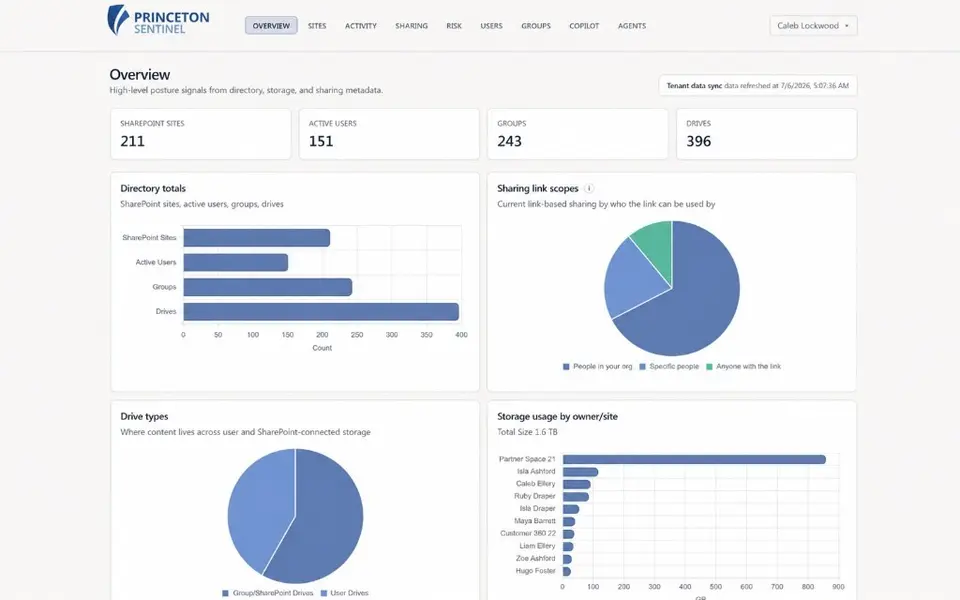
Princeton Sentinel
Copilot Studio agent telemetry, prompt-injection classification, oversharing and stale-access detection, executive posture trends. Entra ID sign-in, runs in your Azure tenant.
See Sentinel →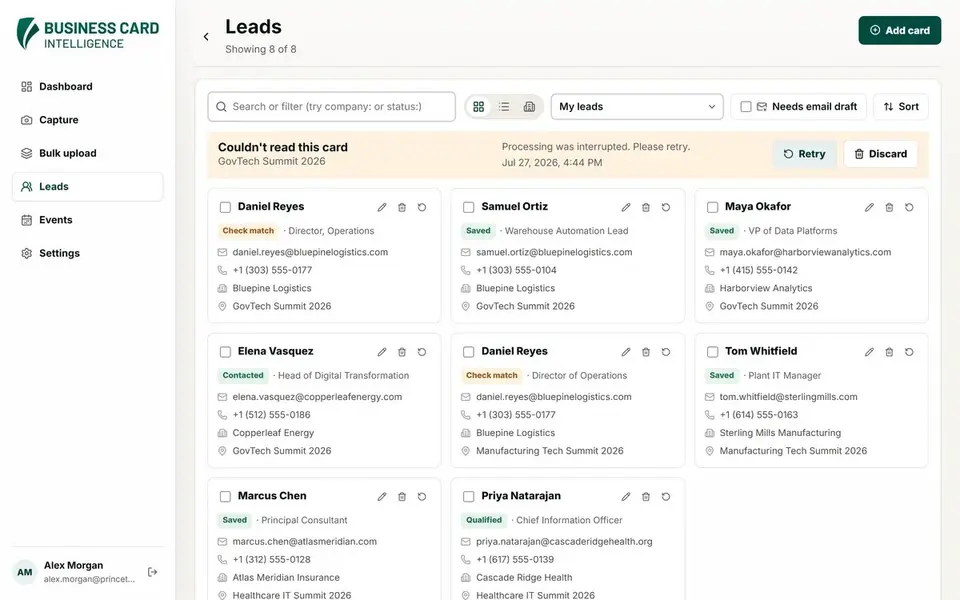
Business Card Intelligence
Scan cards, PDFs or QR codes, get deduplicated leads, AI-drafted follow-ups in your own Outlook, reminders and company news. Mobile app in beta.
See Lead Capture →Services
AI leads. Underneath it sit twenty years of infrastructure, database and Microsoft work, and managed IT as your Managed Service Provider (MSP). Each practice has its own page and case studies.
Support, security and monitoring from one MSP
Agents and models that do real work
Migrations and DBAs, without downtime
Move to the cloud, build for it
Web, mobile and hybrid software
Fabric, Azure, security and SharePoint
Connect the systems you already run
SAS for regulated industries
Trusted data, reports and analytics agents
Insights
118 articles this year on Copilot, Purview, Azure and hybrid AI.
October 16, 2026
October 7, 2026
September 30, 2026
One group, seven brands
We will look at one workflow and tell you what is automatable, what is not, and what the data needs first.