 Princeton IT Services
Resources / Blogs
Document Lifecycle Management for AI
Learn how document lifecycle management helps reduce ROT data, improve data governance, and ensure AI-ready data for Microsoft SharePoint, OneDrive, and Copilot.
The Foundation for AI-Ready Data and Strong Data Governance
In the previous discussion on enterprise AI readiness, one issue stood out: poor data hygiene driven by redundant, outdated, and trivial (ROT) data. While identifying ROT data matters, the real solution is preventing it—starting with document lifecycle management.
Organizations using platforms such as Microsoft SharePoint document management and Microsoft OneDrive document management often accumulate large volumes of unmanaged content. Without a clear content lifecycle management strategy, documents remain stored long after they are relevant. This creates informational clutter, reduces productivity, and impacts enterprise AI data quality, especially for systems like Microsoft Copilot.
Document lifecycle management establishes a structured approach for content creation, usage, review, archiving, and deletion. As part of a broader data governance framework, it ensures that information remains accurate, relevant, and aligned with business needs.
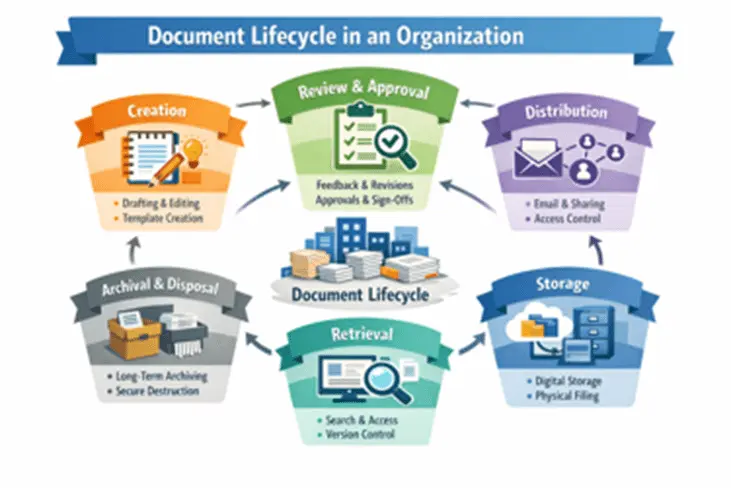
The impact on AI data readiness is significant. When lifecycle policies are properly implemented:
- AI systems retrieve current, accurate, and authoritative information, improving AI data management and decision-making.
- Duplicate and outdated files are reduced, helping eliminate confusion caused by inconsistent data.
- Knowledge repositories evolve into trusted sources, strengthening enterprise content management (ECM) and enabling better AI-driven insights.
Assigning clear ownership of documents plays a critical role in maintaining data quality management. When teams consistently review and update content, organizations can reduce ROT data proactively instead of relying on reactive data cleanup strategies.
For businesses adopting Microsoft Copilot and other AI tools, data governance and compliance are no longer optional. Lifecycle management becomes a key enabler of reliable AI outputs. Without strong information lifecycle management, even advanced AI systems may deliver inconsistent or outdated results.
As organizations continue investing in AI-driven automation, implementing document lifecycle management best practices is one of the most effective steps toward achieving AI-ready data, improving data governance, and building a sustainable digital foundation.

 1,125 → 8,314 files per hour