 Princeton IT Services
Resources / Blogs
What is Concurrency Control in Power Automate?
Learn how Concurrency Control in Power Automate optimizes workflow execution, prevents data conflicts, and ensures efficient automation. Discover best practices and real-world use cases to enhance reliability and performance.
Concurrency control in Power Automate refers to the mechanism that manages how many parallel instances of a flow or action can run simultaneously. It ensures workflows function reliably, especially in scenarios where simultaneous executions could lead to errors, conflicts, or data inconsistencies.
Why is Concurrency Control Important?
Concurrency control is crucial for maintaining the reliability and accuracy of your workflows. It helps:
Prevent Overlapping Executions: Avoid scenarios where multiple flow instances attempt to modify the same data or resource at the same time.
Improve Workflow Efficiency: Handle high-volume data processing while maintaining control over execution limits.
Ensure Data Integrity: Prevent duplicate or conflicting actions when dealing with sensitive or critical operations.
How Does Concurrency Control Work in Power Automate?
Power Automate executes multiple instances of a flow or action concurrently by default. Concurrency control settings allow you to limit parallel executions or enforce sequential execution, ensuring the workflow behaves as expected. These settings can be applied to individual actions, triggers, and loops, such as the “Apply to Each” action.
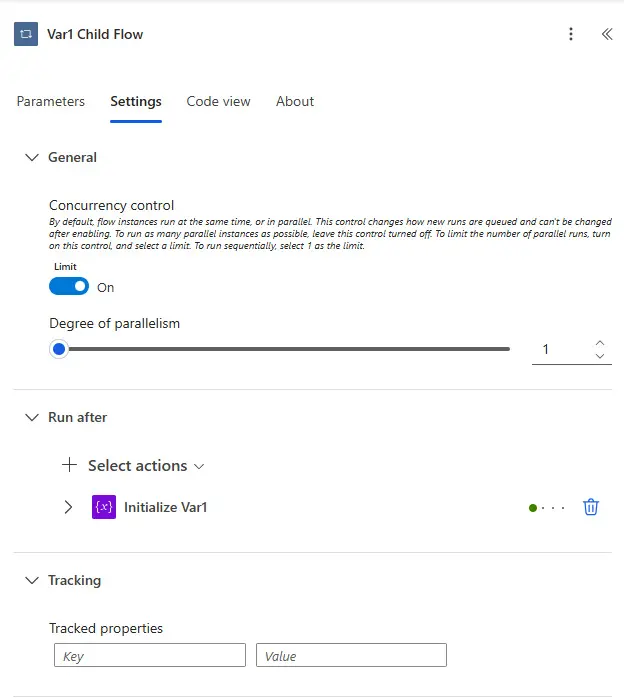
Here is an example of an “Apply to Each” action in one of my flows and this is where you can find the concurrency control settings in the action settings. Note that in this case, I need the flow to run sequentially and hence I have set concurrency control to 1. This will be explained in the next section.
Types of Concurrency Control in Power Automate and Use Cases
Power Automate provides various concurrency control options to fit different workflow scenarios. These options are particularly significant for actions like “Apply to Each,” which processes lists of items. Below are the main types of concurrency control:
1. Parallel Execution (Default Setting)
Description: Multiple instances of the flow or action run concurrently, allowing for faster processing of tasks.
Use Case:
Ideal for independent tasks where processing each item does not depend on the order or result of others.
Common in workflows like sending multiple email notifications, logging independent events, or processing API calls without dependencies.
2. Custom Degree of Parallelism
Description: Sets a specific limit on how many instances can run concurrently. For example, setting a degree of 3 allows only three items or actions to be processed simultaneously.
Use Case:
Useful for workflows involving external systems with rate limits, such as APIs, or tasks where too many simultaneous actions might overload the system.
Balances efficiency with resource constraints in scenarios like database updates or file transfers.
3. Sequential Execution (Concurrency Disabled)
Description: Ensures items or actions are processed one at a time, maintaining strict execution order.
Use Case:
Necessary for scenarios requiring precise sequencing, such as approval workflows or updating shared resources like a database.
Ideal for workflows that involve dependent tasks or actions where concurrency could cause data conflicts or duplication.
Best Practices for Using Concurrency Control
1- Analyze Workflow Needs: Assess whether tasks can run in parallel or require sequential execution to ensure optimal design.
2- Set Logical Limits: Avoid excessive concurrency that might strain systems or exceed resource limits.
3- Monitor Performance: Regularly review logs and analytics to identify bottlenecks or inefficiencies caused by concurrency settings.
4- Combine with Error Handling: Use error-handling mechanisms like “Configure Run After” to manage unexpected failures effectively.
Common Scenarios Where Concurrency Control is Useful
1- Email Notifications: Send multiple emails concurrently for improved performance without overwhelming the mail server.
2- Data Processing: Sequentially process sensitive data to avoid corruption or duplicates.
3- File Management: Limit concurrent file uploads or downloads to prevent overloading storage systems.
4- Approval Workflows: Ensure that sequential approvals maintain a clear and logical order.
Bottom Line
Concurrency control in Power Automate is a powerful feature that enables reliable, efficient, and scalable workflows. Whether optimizing performance with parallel execution or maintaining precision with sequential processing, understanding and leveraging concurrency settings is essential for workflow success.
However, configuring concurrency control for complex workflows can be challenging. Our Power Automate experts are here to help you design and optimize workflows tailored to your business needs. Contact us today to unlock the full potential of Power Automate and transform your operations.
 Hours of daily filing down to minutes