 Princeton IT Services
Resources / Blogs
Ataccama ONE Lookup Items: Easy Data Validation
Step-by-step guide to using lookup items in Ataccama ONE. Validate data with lookup tables, automate updates, and strengthen your data quality framework.
Building and Managing Lookup Items in Ataccama ONE for Data Quality Validation
Many of the most critical data quality checks come down to a simple question: is this value part of an approved reference list? Whether you are validating country codes, product categories, currency identifiers, or customer status values, organizations rely on reference data validation to maintain accuracy and consistency.
In Ataccama ONE, these reference datasets are managed as Lookup Items—structured, version-controlled assets that integrate directly with the data quality rules engine. This makes it easier to enforce data validation rules and improve overall data integrity across systems.
What Is a Lookup Item in Data Quality?
A lookup item is a managed reference dataset used to validate values in your data pipelines. It plays a key role in lookup-based validation, where incoming data is checked against predefined, approved values.
Using rule conditions like “is from lookup” and “is not from lookup”, you can quickly determine whether a value meets your data quality validation rules:
- If the value exists in the lookup → it passes
- If the value is missing → it is flagged as invalid
This approach is widely used in data validation using lookup tables, ensuring consistency across enterprise systems.
Lookups in Ataccama ONE can be created from:
- Existing catalog items within the platform
- Uploaded lookup files (.lkp) created externally
This flexibility supports scalable reference data management and aligns with modern data governance tools.
How to Create a Lookup Item in Ataccama ONE
Creating lookup items is simple and designed for both technical and business users working with data quality management tools.
Lookup items are managed under Data Quality > Lookup Items. The creation flow is straightforward:
- Navigate to Data Quality > Lookup Items and select Create.
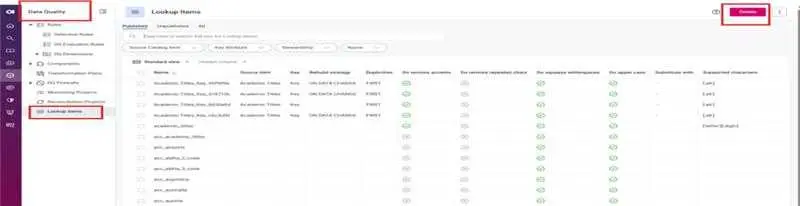
- Provide a name and an optional description to make the lookup discoverable by other users.

- Choose your source. Select Choose from Catalog Items to pull values directly from a cataloged attribute, or Upload from computer to supply a lookup file (.lkp) built in ONE Desktop.
- If building from a catalog item, select the catalog item and the specific attribute whose values will form the lookup.
- Configure duplicate handling and matching options, then save. The lookup build starts automatically.
Once created, the lookup becomes a reusable asset for data quality automation and validation workflows.
Using Lookup Items in Data Quality Rules
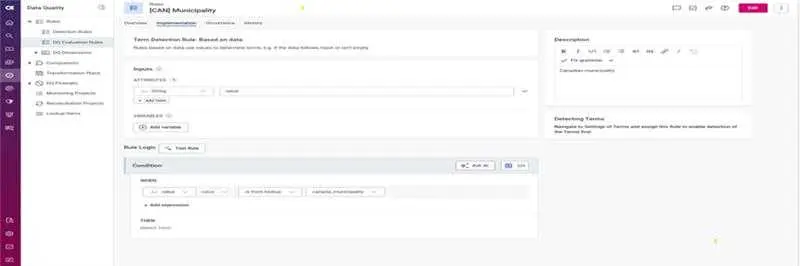
After publishing, lookup items can be applied directly in data quality rules using:
- is from lookup
- is not from lookup
These rules form the backbone of enterprise data quality solutions, helping teams standardize validation logic.
In many cases, lookup items are automatically created when you define rules using catalog-based conditions. This simplifies the process and ensures consistency across data quality monitoring tools.
For better reporting and readability, use naming conventions like:
- INVALID_LOOKUP_VALUE
- NOT_IN_LOOKUP
This makes data quality monitoring outputs easier to interpret and act on.
Keeping Lookup Items Updated for Accurate Data Validation
Reference data is not static. New values are introduced, and outdated ones must be removed. Keeping lookup items current is essential for maintaining accurate data validation frameworks.
Ataccama ONE supports two update methods:
Manual Updates
- Rebuild lookups using the latest data
- Upload new versions of lookup files
- Publish updates to apply changes
Scheduled Rebuilds
- Automate refresh cycles for dynamic datasets
- Ideal for frequently changing catalog attributes
Scheduled updates are especially useful for maintaining data quality automation at scale and ensuring your validation rules stay relevant.
Why Lookup Items Matter in Data Governance
Lookup items transform static lists into governed, reusable assets. They are a critical part of data governance tools, enabling organizations to:
- Enforce consistent validation across systems
- Improve data accuracy and integrity
- Scale data quality management processes
- Support continuous data quality monitoring
When combined with automation and catalog-driven sources, lookup items ensure that your data quality rules engine remains effective—not just at setup, but over time as your data evolves.
Conclusion
Lookup items in Ataccama ONE provide a practical and scalable way to implement reference data validation. By using lookup-based validation, organizations can improve accuracy, reduce errors, and strengthen their overall data governance strategy.
Whether you are building simple validation checks or complex enterprise data quality solutions, lookup items are a foundational component for reliable, high-quality data.
 Data issues tracked from detection to fix