 Princeton IT Services
Resources / Blogs
AI Builder vs Azure AI Document Intelligence
Compare AI Builder and Azure AI Document Intelligence. Learn key differences, pricing, and when to use each for document processing in Power Platform and Azure.
Choosing between Microsoft AI Builder and Azure AI Document Intelligence is one of the most common decisions for teams building document automation in Power Platform. Microsoft doesn’t provide a direct comparison, but in practice, the choice isn’t about features—it’s about where you build, how you scale, and what happens after extraction.
The Decision Isn’t About Features — It’s About Where You Build
Before comparing capabilities, ask a more practical question:
Where are you building, and what does your output need to do next?
For most teams working with Power Automate, Dataverse, or Power Apps, the decision is driven by:
- Integration within the Power Platform
- Complexity of document processing
- Scalability and cost at volume
The difference becomes clearer when you look at real-world AI document processing use cases.
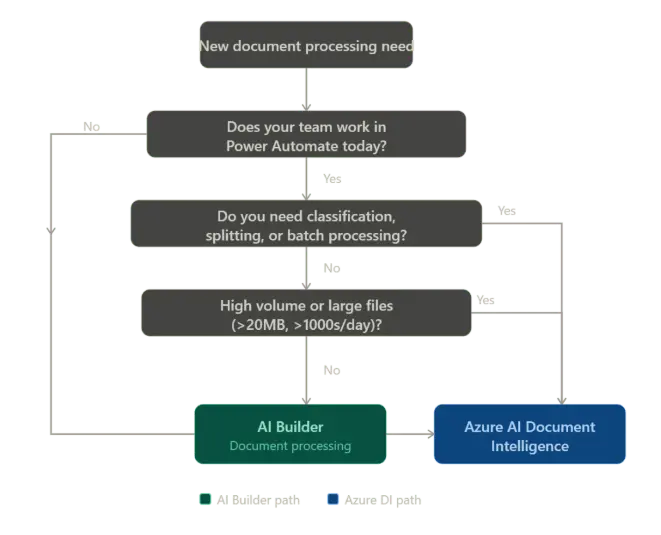
The flowchart provides a quick guide to deciding between the tools but let’s look deeper against actual use cases.
Scenario A: Structured Automation in Power Platform
You’re building invoice processing with AI Builder inside Power Platform:
- Documents are consistent PDFs from known vendors
- A Power Automate flow triggers from a shared mailbox
- Data is extracted and written into Dataverse
- Notifications are sent to the AP team
In this case, AI Builder for invoice processing is the right fit.
It offers:
- Prebuilt models for invoice data extraction
- Native integration with Power Platform
- Fast deployment with minimal setup
For structured workflows like this, AI Builder Power Platform integration keeps everything simple and efficient.
Scenario B: Complex, Unstructured Document Pipelines
Now consider a more advanced scenario:
- Contracts arrive in multiple formats
- Documents must be classified before extraction
- Some files exceed standard size limits
- Results need to be sent to external APIs
This is where AI Builder limitations start to surface:
- No native document classification
- Limited handling of large or complex files
- Restricted extensibility outside Power Platform
At this stage, Azure AI Document Intelligence becomes the better choice.
With Azure, you can:
- Use custom models for unstructured document processing
- Handle large files and varied formats
- Integrate with APIs, microservices, and backend systems
- Build scalable pipelines for enterprise document automation
This flexibility makes Azure Document Intelligence use cases ideal for complex and high-volume workloads.
AI Builder vs Azure AI Document Intelligence: Key Difference
The comparison is less about capability overlap and more about architecture:
- AI Builder → Best for Power Platform document automation
- Azure AI Document Intelligence → Best for scalable, API-driven document processing
If your workflow lives entirely inside Power Platform, AI Builder is usually enough.
If you need advanced orchestration, classification, or external integrations, Azure is the better path.
When to Move from AI Builder to Azure AI
Most teams start with AI Builder—and that’s the right approach.
The signal to switch comes when:
- You’re building workarounds for file size or field limits
- You need classification before extraction
- You’re routing documents across multiple flows
- Performance or cost becomes unpredictable at scale
At that point, moving to Azure AI Document Intelligence APIs often reduces long-term complexity.
Cost Considerations: AI Builder vs Azure AI Pricing
Pricing also plays a role in your decision:
- AI Builder credits pricing works well for smaller workloads
- Azure Document Intelligence cost per page is more predictable at scale
With the shift toward Copilot credits, teams handling large volumes should evaluate Azure AI pricing for document processing early in the design phase.
What’s Next in Microsoft Document AI
Both tools are evolving toward agent-driven document automation:
- AI Builder is expanding with deeper integration in Copilot Studio document processing
- Azure AI Document Intelligence is part of a broader ecosystem supporting multimodal and large-scale processing
As Microsoft document processing AI tools evolve, the gap between low-code and pro-code solutions will continue to narrow—but the architectural decision will still matter.
Final Takeaway
Choosing between AI Builder vs Azure AI Document Intelligence comes down to this:
- Use AI Builder for fast, structured workflows inside Power Platform
- Use Azure AI Document Intelligence for complex, scalable, and extensible document pipelines
Start simple, but design with scale in mind. The right choice isn’t about what the tool can do—it’s about how far your solution needs to go.
 Hours of daily filing down to minutes