

Custom Prompts vs. Agent Instructions: What’s the Difference, When Should You Use Each?
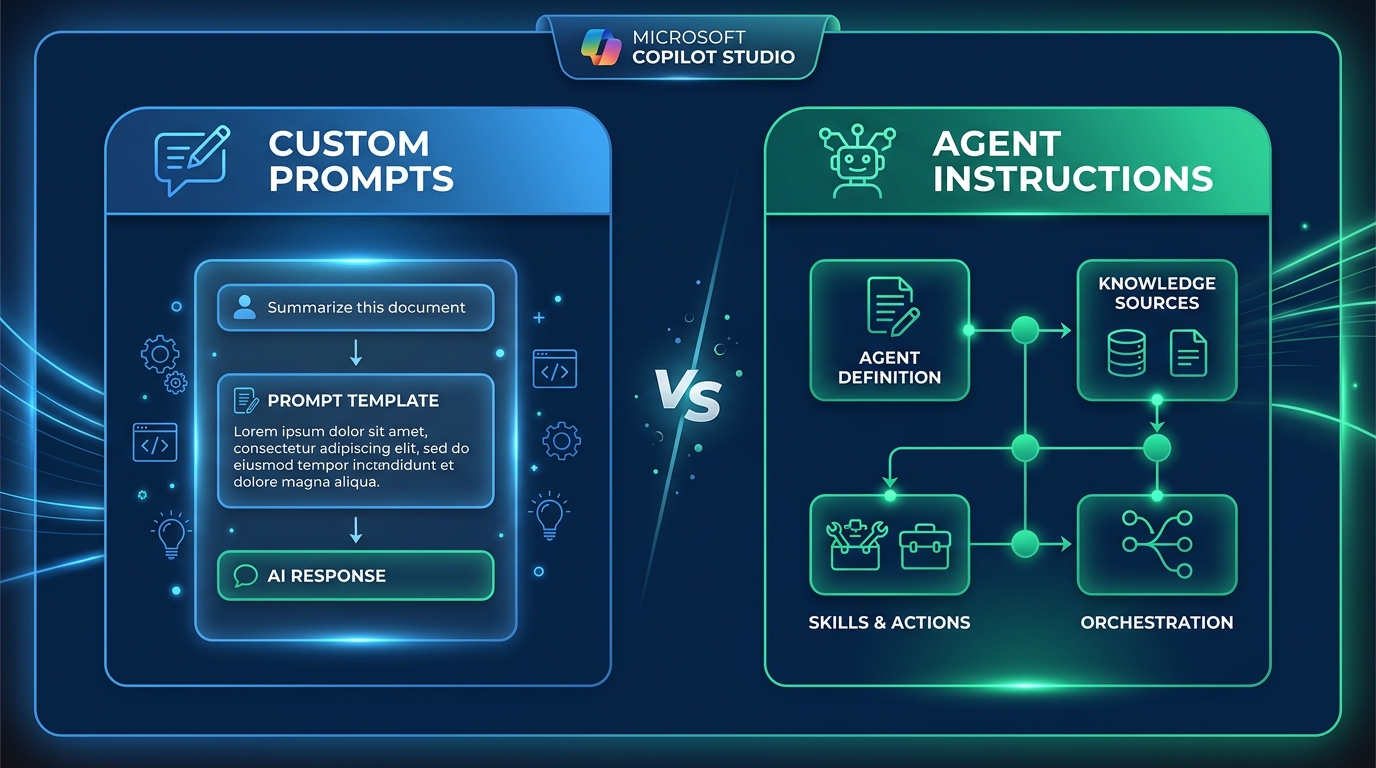
| Design Dimension | Agent Instructions | Custom Prompts |
|---|---|---|
| Scope | Controls the complete agent | Completes a particular task |
| Activation | Applies across conversations | Runs only when required |
| Purpose | Define role, tone, scope, and boundaries | Define task inputs, steps, and outputs |
| Guidance | Guides tool & knowledge selection | Transforms supplied information |
| Consistency | Creates behavioral consistency | Creates consistency for a deliverable |
Overview
As AI agents become embedded in business workflows, teams often face a key design decision: should a requirement
be added to the agent instructions, or implemented as a custom prompt? Choosing the right approach makes an
agent more accurate, consistent, reusable, and easier to maintain. In Microsoft Copilot Studio, understanding
the difference between Copilot Studio custom prompts and Copilot Studio agent instructions can help teams build
more reliable AI agents.
The simplest distinction is this: agent instructions define how the agent behaves overall, while custom prompts
guide it through a focused, repeatable task.
What Are Agent Instructions?
Agent instructions are high-level guidelines that shape the agent’s behavior across conversations. In
Microsoft Copilot Studio, these instructions help establish how an AI agent should operate and respond to users.
They typically define:
- ✓The agent’s role and purpose
- ✓The topics it should address
- ✓Its tone and response style
- ✓Business rules and boundaries
- ✓When to use tools or knowledge sources
- ✓How to handle missing information
using approved sources. Never invent missing information. Separate facts from recommendations and explain
technical terms in plain language.
Because these directions apply broadly, they belong at the agent level. In platforms such as Microsoft Copilot
Studio, agent instructions can also guide the agent in selecting tools, knowledge sources, and topics when
responding to a user. For organizations building Copilot Studio agents, clear instructions help maintain
consistent behavior across different conversations and business scenarios.
What Is a Custom Prompt?
A custom prompt is designed for a specific AI task. In Copilot Studio, custom prompts can provide detailed
instructions for processing information and returning a defined type of result. They are useful for:
- ✓Summarizing documents
- ✓Creating performance reports
- ✓Categorizing customer feedback
- ✓Extracting important details
- ✓Comparing results
- ✓Producing executive summaries
three key findings. It could also require the model to rely only on the supplied information and identify
any missing details.
Copilot Studio custom prompts are particularly useful when a business needs the same task to be completed
consistently across different inputs, customers, departments, or workflows. In Microsoft Copilot Studio, custom
prompts can be added as tools, placed within topics, or called from agent flows. They can accept runtime inputs
such as text, documents, images, and business metrics.
How to Decide: Instructions or Custom Prompt?
The decision between agent instructions and custom prompts is a matter of scope. Use the decision paths below to
place each requirement in the right location.
How does Copilot
Studio route a new requirement?
Follow the decision paths to place requirements
in the right location.
Applies Broadly
across all conversations?
INSTRUCTIONS
tone, scope, and boundaries for the entire agent.
Task Specific
clear inputs and outputs?
PROMPT
inputs, processing steps, and the expected output format.
behavior AND a structured task output?
BOTH
set the foundation; custom prompts handle the specific task deliverable.
1. Agent Instructions Control the Complete Agent
Because agent instructions apply globally, they establish the foundation for every conversation the agent has.
In Microsoft Copilot Studio, clear instructions help the agent maintain consistent behavior across different use
cases, departments, and business scenarios. Agent instructions can also guide the agent in selecting which
tools, knowledge sources, and topics to use when responding to users.
2. Custom Prompts Run Only When Required
Unlike agent instructions, a custom prompt is only activated when the agent—or a topic or
flow—invokes it. This makes custom prompts ideal for tasks that need to be performed on demand, such as
summarizing a document, classifying a support ticket, or generating a performance report from supplied data.
3. Custom Prompts Accept Dynamic Runtime Inputs
One of the key strengths of Copilot Studio custom prompts is their ability to accept runtime inputs. These
inputs can include text, documents, images, and business metrics. This flexibility allows a single prompt to
serve multiple customers, departments, or reporting periods without requiring separate versions for each use
case.
4. Keep Exact Calculations Outside Prompts
Custom prompts work well for summarization, explanation, extraction, and classification. Critical calculations,
however, should be performed by code, a trusted data pipeline, or a deterministic workflow.
Calculate financial or performance metrics before sending them to a custom prompt. The prompt can then explain
the results, highlight patterns, and recommend next steps. This separation improves accuracy, repeatability,
testability, and auditability. It also reduces the risk that missing values will be interpreted as genuine
results.
5. Why Effective AI Agents Use Both
Agent instructions and custom prompts are complementary, not competing, capabilities. A typical interaction in
Microsoft Copilot Studio follows this pattern:
- ✓Agent instructions establish the agent’s role, boundaries, and communication
style. - ✓The agent identifies the user’s request and selects the appropriate tool or
data source. - ✓A custom prompt transforms the retrieved information into a structured
response. - ✓The agent presents the result according to its overall communication
guidelines.
Using both AI agent instructions and custom prompts allows organizations to separate broad agent behavior from
specific business tasks. This can make Copilot Studio agents easier to manage as workflows become more complex.
Advantages of Custom Prompts
- ✓Consistency: Enforce the same structure, tone, and level of detail
each time the prompt runs. - ✓Personalization: Use dynamic inputs so one prompt can support
different customers, departments, products, audiences, and reporting periods. - ✓Reusability: Build the prompt once and use it across multiple
topics, agents, applications, or workflows. - ✓Easier testing: Evaluate a focused prompt independently with
normal, incomplete, and unexpected inputs. - ✓Faster improvement: Refine a summary or classification task
without redesigning the agent. - ✓Maintainability: Separate global behavior from task-specific
instructions so agent instructions remain concise and manageable.
These benefits make Copilot Studio custom prompts useful for organizations that need repeatable AI tasks without
adding every task-specific requirement to their main agent instructions.
Results & Benefits
By clearly separating agent instructions from custom prompts, organizations building on Microsoft Copilot Studio
can achieve more reliable, scalable, and maintainable AI agents. Key business benefits include:
- ✓Consistent Agent Behavior: Agent instructions ensure the AI
communicates, prioritizes, and behaves the same way across every interaction. - ✓Reusable Task Logic: Custom prompts can be built once and deployed
across multiple agents, topics, and workflows. - ✓Easier Maintenance: Focused, separated components make it faster
to test, update, and improve individual parts of the agent without unintended side effects. - ✓Dynamic Personalization: Runtime inputs allow a single custom
prompt to serve multiple use cases, departments, and audiences without duplication. - ✓Improved Accuracy: Keeping calculations in deterministic pipelines
and using prompts only for analysis reduces the risk of incorrect AI-generated results.
Conclusion
Use agent instructions to define who the agent is, how it communicates, which boundaries it must follow, and
when it should use available resources.
Use Copilot Studio custom prompts to define a focused task, its runtime inputs, processing requirements, and
expected output format.
The strongest AI agents combine both: Copilot Studio agent instructions provide a dependable foundation, while
custom prompts add specialized, reusable capabilities.
Before adding a new requirement, ask: Is this a rule for the agent, or a task the agent needs to perform? The
answer will usually reveal where it belongs.
Categories
- Accessibility solutions (3)
- AI / LLMOps (AI Observability & Monitoring) (3)
- AI & Automation (17)
- AI Governance & Responsible AI (4)
- AI Security (4)
- Android (17)
- Angular JS (1)
- API & Integration / Developer Tools (1)
- Apple (3)
- Artificial Intelligence (1)
- Artificial Intelligence (AI) (16)
- AV & Collaboration Technology (2)
- AWS Cloud Computing (2)
- AWS DMS (6)
- AWS RDS (12)
- Azure (3)
- BI & ANALYTICS (16)
- Cloud Computing & AI (5)
- Cloud Identity & Directory Services (1)
- Cloud Migration (12)
- Cloud Security & Identity Management (3)
- Company News (5)
- Continuous integration and continuous deployment (2)
- Cybersecurity (7)
- Data Analytics (12)
- Data Engineering (8)
- Data Governance & Compliance (6)
- Data Management (5)
- Data Migration (9)
- Data Quality (1)
- Data Quality & Data Governance (1)
- DBA (10)
- DevOps (1)
- Email Security (1)
- Endpoint Management / Device Management (1)
- Enterprise AI / AI Governance (1)
- Enterprise AI / AI Implementation Best Practices (1)
- Enterprise AI & Intelligent Automation (2)
- Enterprise Mobility & Security (1)
- Enterprise Software Integration / Backend Development (1)
- Enterprise Technology (1)
- Enterprise UX/UI Design (1)
- Goldengate (19)
- Google (2)
- Hadoop (3)
- HPNA (1)
- Ios (10)
- ios 10 (2)
- iPad (3)
- iPhone (3)
- Licensing (7)
- Linux (13)
- Machine Learning Solutions (1)
- Marketing Technology (1)
- Microsoft 365 (1)
- Microsoft 365 Development / APIs (1)
- Microsoft 365 Security & Compliance (4)
- Microsoft Configuration Manager (SCCM / MECM) (1)
- Microsoft Dynamics 365 (4)
- Microsoft Marketplace (1)
- Microsoft Office (5)
- Microsoft Purview (3)
- Microsoft SharePoint & Security (1)
- Microsoft Teams / Collaboration Tools (1)
- Microsoft Teams Security & Compliance (2)
- Mobile (2)
- Network Automation (5)
- Network Security Services (1)
- News (21)
- Operating System (1)
- Oracle (37)
- oracle consulting (3)
- PostgreSQL (1)
- Quantum Computing (1)
- Quickbooks (1)
- SEO (1)
- Software Development (33)
- Systems Automation (2)
- Tech (3)
- Technology (51)
- UI (13)
- Uncategorized (8)
- UX (9)
- VSTO (1)
- Web Development (1)
- Windows (9)
- wordpress (1)