

Microsoft Purview Audit Log Access:
Comparing UAL, Management Activity API, and CloudAppEvents
Introduction
Audit logs are systematically organized records documenting activities within Microsoft 365 Audit Logs, detailing the actor, action, timestamp, origin, and affected resource. Microsoft Purview Audit Logs aggregate these events to help organizations perform security investigations, support regulatory compliance requirements, and improve operational visibility across Microsoft 365 environments.
Given the diversity of these requirements, Microsoft Purview provides access to audit data through three distinct interfaces. Each interface balances comprehensiveness, response time, query flexibility, and automation capabilities differently; therefore, selecting the appropriate interface is critical before commencing any development, compliance, or investigative effort.
This document presents a concise overview of the three Microsoft Purview audit interfaces and outlines their optimal use cases for Microsoft 365 security monitoring, compliance reporting, and threat investigations.
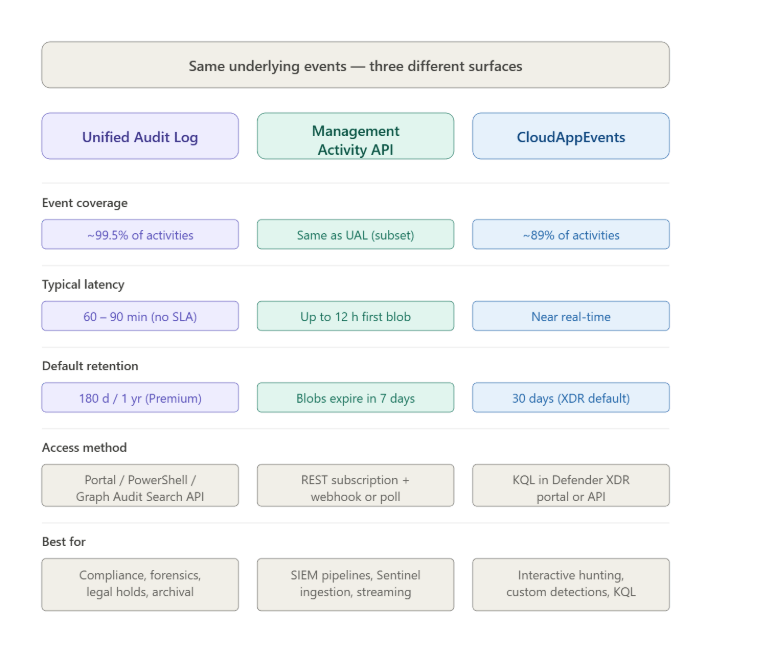
The three Microsoft Purview audit surfaces
Surface 1: The Unified Audit Log (UAL)
The Unified Audit Log (UAL) is the authoritative source for Microsoft Purview Audit Logs. Accessible through the Purview portal search interface, Search-UnifiedAuditLog in Exchange Online PowerShell, or the Audit Search Graph API, it captures the broadest set of events across Microsoft 365. This includes thousands of user and administrator activities spanning Exchange Online, SharePoint Online, OneDrive, Microsoft Teams, and other Microsoft services.
Independent testing of 191 unique activities found the Unified Audit Log capturing approximately 99.5% of activities, making it the most comprehensive source for Microsoft 365 Audit Log investigations.
The tradeoff is latency. Microsoft prioritizes data completeness over speed. For core services such as Exchange, SharePoint, OneDrive, and Teams, event availability typically ranges from 60 to 90 minutes. For other services, availability may take longer without a documented upper limit.
Retention defaults differ by licensing level. Audit (Standard) retains logs for 180 days, while Audit (Premium) extends Microsoft Purview Audit Log Retention to one year by default, with policies capable of extending retention up to 10 years.
Best for: compliance investigations, legal holds, forensic analysis, regulatory audits, and situations where completeness is more important than speed.
Surface 2: The Office 365 Management Activity API
The Office 365 Management Activity API serves as the programmatic access layer for organizations building Microsoft Sentinel Audit Logs, SIEM integrations, custom monitoring tools, and enterprise security analytics platforms.
This interface operates through subscriptions and webhooks, delivering content blobs that applications can poll or receive as they become available. It is commonly used for SIEM Integration with Microsoft 365 Audit Logs and long-term audit data ingestion.
When a subscription is created, the first content blobs may take up to 12 hours to become available. Events within those blobs may not appear in chronological order, and a single content blob can contain events that occurred before those found in earlier blobs. Additionally, the API does not perform deduplication, requiring consuming systems to manage duplicate events independently.
Audit (Premium) provides higher-bandwidth access to the Management Activity API, enabling faster delivery of audit records for large enterprise tenants with extensive logging requirements.
Best for: SIEM pipelines, Microsoft Sentinel OfficeActivity table ingestion, continuous security monitoring, compliance reporting, and long-term archival using Azure Data Explorer or Event Hub.
Surface 3: Advanced Hunting — CloudAppEvents
CloudAppEvents within Microsoft Defender XDR Advanced Hunting is the most capable interface for query-driven investigations and custom detection development. It combines Microsoft Purview Audit Logs with broader Defender XDR telemetry, enabling analysts to correlate cloud application activity, endpoint events, and identity signals using KQL.
The same independent research found CloudAppEvents capturing roughly 89% of activities, significantly lower than the coverage available through the Unified Audit Log. Certain events, including UserLoggedIn and UserLoginFailed, are stored in dedicated sign-in log tables rather than the CloudAppEvents table. Some Exchange Online activities visible within Microsoft Purview Audit Logs may also be absent.
A common configuration requirement involves enabling Microsoft 365 activity collection within Defender. Administrators should navigate to Defender Settings > Cloud Apps > App Connectors and ensure Microsoft 365 Activities is enabled. Without this configuration, CloudAppEvents may return incomplete results even when the connector appears connected.
Best for: interactive investigations, custom KQL detections, Microsoft Defender XDR Advanced Hunting, threat hunting, and cross-signal security analysis.
The coverage reality
No single interface captures every event. The relationship between these audit surfaces is not hierarchical; instead, they provide overlapping but distinct visibility into Microsoft 365 activity.
The Unified Audit Log offers the broadest coverage and remains the primary source for compliance investigations and forensic analysis. CloudAppEvents provides the most advanced query capabilities through KQL but covers fewer events. The Office 365 Management Activity API remains the preferred mechanism for streaming audit data into SIEM and monitoring platforms, though developers must account for event ordering and deduplication challenges.
For organizations building enterprise-grade Microsoft 365 Security Monitoring and compliance solutions, a combined approach is often the most effective strategy:
- Unified Audit Log as the authoritative audit archive
- Office 365 Management Activity API for continuous data ingestion
- CloudAppEvents for advanced hunting and security investigations
Up next
Blog 1.2 explores Microsoft Purview Audit Log Retention in greater detail, including differences between E3 and E5 licensing, premium audit events, compliance requirements, and considerations for organizations developing compliance tooling across multiple Microsoft 365 tenants.
Categories
- Accessibility solutions (3)
- AI / LLMOps (AI Observability & Monitoring) (3)
- AI & Automation (17)
- AI Governance & Responsible AI (4)
- AI Security (4)
- Android (17)
- Angular JS (1)
- API & Integration / Developer Tools (1)
- Apple (3)
- Artificial Intelligence (1)
- Artificial Intelligence (AI) (16)
- AV & Collaboration Technology (2)
- AWS Cloud Computing (2)
- AWS DMS (6)
- AWS RDS (12)
- Azure (3)
- BI & ANALYTICS (16)
- Cloud Computing & AI (5)
- Cloud Identity & Directory Services (1)
- Cloud Migration (12)
- Cloud Security & Identity Management (3)
- Company News (5)
- Continuous integration and continuous deployment (2)
- Cybersecurity (7)
- Data Analytics (12)
- Data Engineering (8)
- Data Governance & Compliance (6)
- Data Management (5)
- Data Migration (9)
- Data Quality (1)
- Data Quality & Data Governance (1)
- DBA (10)
- DevOps (1)
- Email Security (1)
- Endpoint Management / Device Management (1)
- Enterprise AI / AI Governance (1)
- Enterprise AI / AI Implementation Best Practices (1)
- Enterprise AI & Intelligent Automation (2)
- Enterprise Mobility & Security (1)
- Enterprise Software Integration / Backend Development (1)
- Enterprise Technology (1)
- Enterprise UX/UI Design (1)
- Goldengate (19)
- Google (2)
- Hadoop (3)
- HPNA (1)
- Ios (10)
- ios 10 (2)
- iPad (3)
- iPhone (3)
- Licensing (7)
- Linux (13)
- Machine Learning Solutions (1)
- Marketing Technology (1)
- Microsoft 365 (1)
- Microsoft 365 Development / APIs (1)
- Microsoft 365 Security & Compliance (4)
- Microsoft Configuration Manager (SCCM / MECM) (1)
- Microsoft Dynamics 365 (4)
- Microsoft Marketplace (1)
- Microsoft Office (5)
- Microsoft Purview (3)
- Microsoft SharePoint & Security (1)
- Microsoft Teams / Collaboration Tools (1)
- Microsoft Teams Security & Compliance (2)
- Mobile (2)
- Network Automation (5)
- Network Security Services (1)
- News (21)
- Operating System (1)
- Oracle (37)
- oracle consulting (3)
- PostgreSQL (1)
- Quantum Computing (1)
- Quickbooks (1)
- SEO (1)
- Software Development (33)
- Systems Automation (2)
- Tech (3)
- Technology (51)
- UI (13)
- Uncategorized (8)
- UX (9)
- VSTO (1)
- Web Development (1)
- Windows (9)
- wordpress (1)