

Microsoft Dataverse REST Integration: Key Insights & Pitfalls
Integrating Microsoft Dataverse via REST: Key Insights and Common Pitfalls
Microsoft Dataverse is the data backbone behind Power Platform: Power Apps, Power Automate, Copilot Studio. When reading from or writing to it programmatically from a backend service, the interaction is with its OData v4 REST API. It’s capable, but the path from “it works in the browser” to “it works reliably in production” has some sharp edges. This post covers lessons learned while building a service that both reads from and writes to Dataverse using client credentials.
Authentication: Client Credentials, Not Delegated
When building a backend service (no user context), the OAuth 2.0 client credentials flow is the right approach. The app authenticates with Azure AD using a client ID and secret, and gets a token scoped to the Dataverse environment.
scopes = [“https://yourorg.crm.dynamics.com/.default“]
result = app.acquire_token_for_client(scopes=scopes)
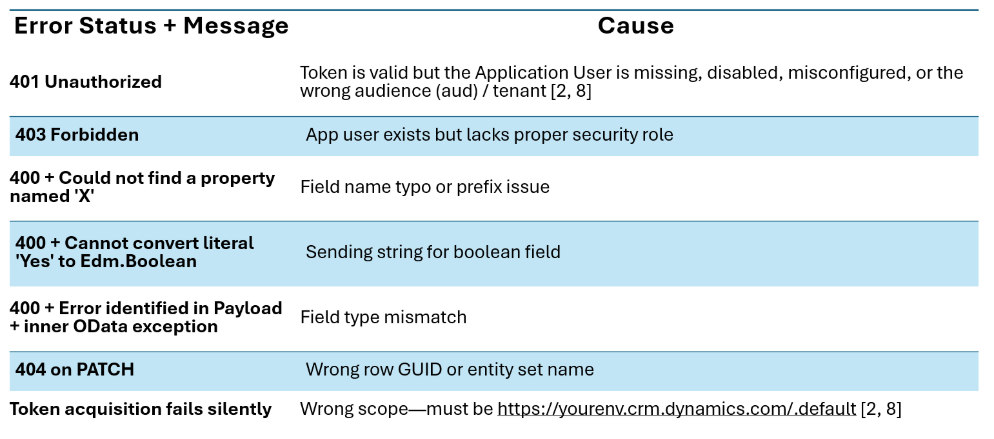
The key detail: the scope must be the Dataverse environment URL, not https://service.powerapps.com or any generic Power Platform scope. Getting this wrong produces a token that looks valid but returns 401 from the API.
Token caching matters too. While access tokens often expire after ~60 minutes, that lifetime isn’t guaranteed; it’s configurable per tenant and app [1]. Always inspect the expires_in field and refresh slightly ahead, not rely on a fixed duration. Acquiring a new token on every request to hit rate limits; cache it instead.
Application Users: The Missing Step
Adding Dataverse.ReadWrite.All API permissions in Azure AD are not enough. For client credentials to work, an Application User must also be created inside the Power Platform environment itself [2]:
- Go to Power Platform Admin Center → the target environment → Settings → Users + permissions → Application users
- Add the app’s client ID
- Assign it a security role (e.g. “Basic User” for read, or a custom role for write)
Without this, requests return 401 Unauthorized even with a valid token and the correct API permission. This step is easy to miss because it’s in a completely separate admin surface from Azure AD.
Reading Data: OData $select and Pagination
The basic GET looks straightforward:
GET /api/data/v9.2/your_entity_sets?$select=field1,field2&$filter=…
A few things to watch out for:
Field names must be exact. Custom fields have publisher prefixes (e.g. cr6c3_agentname). Typos or missing prefixes lead to:
{ “error”: { “message”: “Could not find a property named ‘agentname'” } }
Formatted values are separate annotations. Date/datetime fields come back as ISO strings. To get human-friendly text (e.g., “3 days ago”), add the OData annotations header [3]:
Prefer: odata.include-annotations=*
This returns e.g., [email protected]. The annotated field cannot be $selected directly [4].
Server-side paging is enforced, and client-side iteration is required. Dataverse returns max 5,000 rows per request; if more rows are needed, follow the @odata.nextLink. Not doing so loses rows silently [5].
rows = []
next_url = initial_url
while next_url:
resp = requests.get(next_url, headers=headers)
data = resp.json()
rows.extend(data.get(“value”, []))
next_url = data.get(“@odata.nextLink“)
Writing Data: PATCH and Boolean Fields
Updating a row is a PATCH to:
PATCH /api/data/v9.2/entity_sets(row-guid)
Use If-Match: * to bypass ETags; otherwise, the current ETag must be fetched first.
The boolean trap. Power Apps’ choice/boolean columns look like they store “Yes”/”No” in the UI, but the underlying type is Edm.Boolean. Sending the string “Yes” gives:
Cannot convert the literal ‘Yes’ to the expected type ‘Edm.Boolean’
JSON booleans (true/false) must be sent instead [7].
⚠️ Note: This applies only to Yes/No fields, not Choice (option set) fields, which are integer (Edm.Int32). Sending true or false to an option set will fail.
Text fields are just strings. No surprises there; pass the value as a plain string in the JSON body.
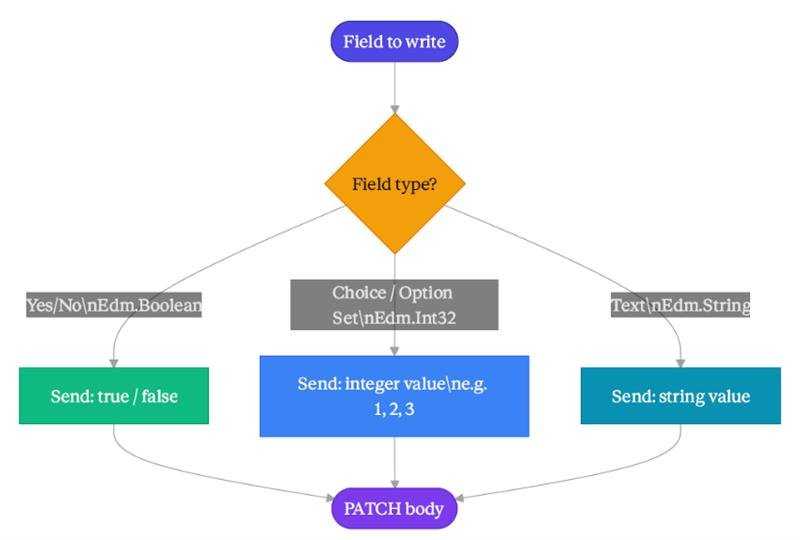
For text, send strings. After a successful PATCH, you get 204 No Content, there’s no ‘body’. Any other status returns OData error JSON in resp.text
Common Errors and What They Actually Mean
Proxying Through a Backend
When calling Dataverse from a frontend app (Next.js, React, etc.), avoid calling it directly; the client’s secret would be exposed. Instead, proxy through a backend:
- Frontend → the API route → backend service → Dataverse
This keeps secrets server-side and enables auth checks (e.g., only admins can write), rate limiting, and audit logging. The Dataverse token stays securely on the server.
Practical Tips
- Test field names with a raw GET first before building write logic — confirm the exact column names coming back from the API
- Log the full error text from failed requests, not just the status code — the OData error body tells exactly what’s wrong [9].
- In PATCH bodies, only include fields intended for update; avoid sending null.
- Environment URLs are unique to each Dataverse environment and must match the intended instance; using a different one, even in the same region, results in auth errors [10, 11].
- Security roles in Power Platform are additive; 403 indicates the Application User needs broader privileges, not removal of roles.
Overall, Dataverse delivers a robust and intuitive OData interface, once authentication and configuration are nailed correctly. The trickiest part is the split between Azure AD (app registration and permissions) and Power Platform Admin Center (Application User and security roles). That two-step setup is where most integration failures happen.
References
[1] Microsoft Entra. Configurable token lifetimes in the Microsoft identity platform. Microsoft Learn.
[2] Microsoft Power Apps. Authenticate to Dataverse with OAuth. Microsoft Learn.
[3] Microsoft Power Apps. Web API query data sample (WebApiService). Microsoft Learn.
[4] Microsoft Power Apps. Query data using the Web API — overview.
[5] Microsoft Power Apps. Page results using the Web API.
[6] Microsoft Power Apps. Query metadata using the Web API.
[7] Microsoft Power Apps. AttributeMetadata reference (Dataverse).
[8] Microsoft Power Apps. Authenticate to Dataverse with the Web API.
[9] Microsoft Power Apps. Compose HTTP requests and handle errors using the Web API.
[10] Microsoft Power Platform. Create and manage environments.
[11] Microsoft Power Platform. Environments overview.
Categories
- Accessibility solutions (3)
- AI / LLMOps (AI Observability & Monitoring) (3)
- AI & Automation (17)
- AI Governance & Responsible AI (4)
- AI Security (4)
- Android (17)
- Angular JS (1)
- API & Integration / Developer Tools (1)
- Apple (3)
- Artificial Intelligence (1)
- Artificial Intelligence (AI) (16)
- AV & Collaboration Technology (2)
- AWS Cloud Computing (2)
- AWS DMS (6)
- AWS RDS (12)
- Azure (3)
- BI & ANALYTICS (16)
- Cloud Computing & AI (5)
- Cloud Identity & Directory Services (1)
- Cloud Migration (12)
- Cloud Security & Identity Management (3)
- Company News (5)
- Continuous integration and continuous deployment (2)
- Cybersecurity (7)
- Data Analytics (12)
- Data Engineering (8)
- Data Governance & Compliance (6)
- Data Management (5)
- Data Migration (9)
- Data Quality (1)
- Data Quality & Data Governance (1)
- DBA (10)
- DevOps (1)
- Email Security (1)
- Endpoint Management / Device Management (1)
- Enterprise AI / AI Governance (1)
- Enterprise AI / AI Implementation Best Practices (1)
- Enterprise AI & Intelligent Automation (2)
- Enterprise Mobility & Security (1)
- Enterprise Software Integration / Backend Development (1)
- Enterprise Technology (1)
- Enterprise UX/UI Design (1)
- Goldengate (19)
- Google (2)
- Hadoop (3)
- HPNA (1)
- Ios (10)
- ios 10 (2)
- iPad (3)
- iPhone (3)
- Licensing (7)
- Linux (13)
- Machine Learning Solutions (1)
- Marketing Technology (1)
- Microsoft 365 (1)
- Microsoft 365 Development / APIs (1)
- Microsoft 365 Security & Compliance (4)
- Microsoft Configuration Manager (SCCM / MECM) (1)
- Microsoft Dynamics 365 (4)
- Microsoft Marketplace (1)
- Microsoft Office (5)
- Microsoft Purview (3)
- Microsoft SharePoint & Security (1)
- Microsoft Teams / Collaboration Tools (1)
- Microsoft Teams Security & Compliance (2)
- Mobile (2)
- Network Automation (5)
- Network Security Services (1)
- News (21)
- Operating System (1)
- Oracle (37)
- oracle consulting (3)
- PostgreSQL (1)
- Quantum Computing (1)
- Quickbooks (1)
- SEO (1)
- Software Development (33)
- Systems Automation (2)
- Tech (3)
- Technology (51)
- UI (13)
- Uncategorized (8)
- UX (9)
- VSTO (1)
- Web Development (1)
- Windows (9)
- wordpress (1)