

Managed vs Unmanaged Solutions in Power Platform Explained
Managed vs Unmanaged Solutions in Power Platform: What You Really Need to Know
If you’ve ever exported a Copilot agent in Microsoft Copilot Studio and paused at the managed vs unmanaged solutions option, you’re not alone. It’s one of those decisions that seems small—but can have a big impact later.
Choose wrong, and you might end up with broken environments, unexpected edits, or support headaches. Choose right, and your Copilot agent deployment becomes smooth, secure, and easy to manage.
Let’s break it down in a simple, practical way.
So, What’s the Actual Difference?
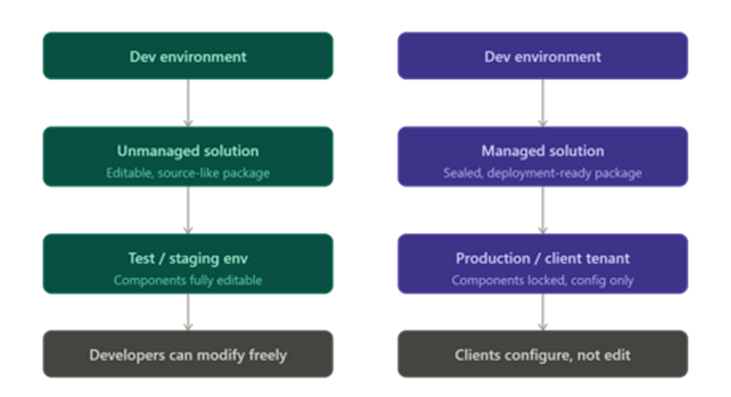
At its core, this is about control vs flexibility in Power Platform solution types.An unmanaged solution is fully open. You (or anyone importing it) can tweak everything—topics, entities, flows, and configurations. It’s ideal for unmanaged solution development, where changes happen frequently.
A managed solution is locked down. Once imported, you can use it and configure settings, but you can’t change the underlying logic. That’s why it’s used for managed solution deployment in stable environments.
A simple way to think about it:
- Unmanaged = your working draft
- Managed = your final, published version
When Should You Use Unmanaged Solutions?
If you’re still building or experimenting, unmanaged is the right choice.
Use it when:
- Moving your agent between dev, test, or UAT environments
- Making frequent updates in Microsoft Copilot solutions
- Testing new topics or flows
- Collaborating with teams that need flexibility
This fits naturally with Power Platform ALM best practices during development.
However, unmanaged solutions shouldn’t be used for final delivery. Since everything is editable, even small accidental changes can create inconsistencies or break functionality.
When Should You Use Managed Solutions?
When it’s time to go live, managed solutions are the safer and more reliable option.
Use them when:
- Deploying to production
- Delivering solutions to clients or across tenants
- Protecting your work within Microsoft Copilot solutions
- Following a structured solution lifecycle in Power Platform
Managed solutions help maintain consistency by preventing direct edits. If changes are needed, you update the solution in development, create a new version, and redeploy. This is a core part of proper Copilot agent deployment.
Key Limitations to Keep in Mind
No matter which option you choose, there are a few important considerations in Power Platform solution management:
- Managed solutions cannot be edited after import
- Poor versioning can lead to conflicts during deployment
- Unmanaged solutions can cause environment drift over time
- Environment variables and connection references must be configured manually
- Dependencies are not always handled automatically
These are common challenges during Copilot Studio solution export, so planning ahead makes a big difference.
Best Practices That Actually Work
To keep things simple and avoid common issues:
- Use unmanaged solutions for development and testing
- Deploy managed solutions to production environments
- Maintain proper version control for every release
- Document environment variables and dependencies clearly
- Never share unmanaged solutions with clients
This approach aligns with proven Power Platform ALM best practices and helps keep deployments stable.
The Bottom Line
You don’t need to overthink it.
- Use unmanaged solutions while building
- Use managed solutions when deploying
Before exporting your solution, ask yourself:
“Am I okay with someone editing everything inside this?”
If not, managed is the right choice.
Getting this decision right will save time, reduce risks, and make your Copilot agent solutions easier to maintain and scale as your Microsoft Copilot solutions evolve.
Categories
- Accessibility solutions (3)
- AI / LLMOps (AI Observability & Monitoring) (3)
- AI & Automation (17)
- AI Governance & Responsible AI (4)
- AI Security (4)
- Android (17)
- Angular JS (1)
- API & Integration / Developer Tools (1)
- Apple (3)
- Artificial Intelligence (1)
- Artificial Intelligence (AI) (16)
- AV & Collaboration Technology (2)
- AWS Cloud Computing (2)
- AWS DMS (6)
- AWS RDS (12)
- Azure (3)
- BI & ANALYTICS (16)
- Cloud Computing & AI (5)
- Cloud Identity & Directory Services (1)
- Cloud Migration (12)
- Cloud Security & Identity Management (3)
- Company News (5)
- Continuous integration and continuous deployment (2)
- Cybersecurity (7)
- Data Analytics (12)
- Data Engineering (8)
- Data Governance & Compliance (6)
- Data Management (5)
- Data Migration (9)
- Data Quality (1)
- Data Quality & Data Governance (1)
- DBA (10)
- DevOps (1)
- Email Security (1)
- Endpoint Management / Device Management (1)
- Enterprise AI / AI Governance (1)
- Enterprise AI / AI Implementation Best Practices (1)
- Enterprise AI & Intelligent Automation (2)
- Enterprise Mobility & Security (1)
- Enterprise Software Integration / Backend Development (1)
- Enterprise Technology (1)
- Enterprise UX/UI Design (1)
- Goldengate (19)
- Google (2)
- Hadoop (3)
- HPNA (1)
- Ios (10)
- ios 10 (2)
- iPad (3)
- iPhone (3)
- Licensing (7)
- Linux (13)
- Machine Learning Solutions (1)
- Marketing Technology (1)
- Microsoft 365 (1)
- Microsoft 365 Development / APIs (1)
- Microsoft 365 Security & Compliance (4)
- Microsoft Configuration Manager (SCCM / MECM) (1)
- Microsoft Dynamics 365 (4)
- Microsoft Marketplace (1)
- Microsoft Office (5)
- Microsoft Purview (3)
- Microsoft SharePoint & Security (1)
- Microsoft Teams / Collaboration Tools (1)
- Microsoft Teams Security & Compliance (2)
- Mobile (2)
- Network Automation (5)
- Network Security Services (1)
- News (21)
- Operating System (1)
- Oracle (37)
- oracle consulting (3)
- PostgreSQL (1)
- Quantum Computing (1)
- Quickbooks (1)
- SEO (1)
- Software Development (33)
- Systems Automation (2)
- Tech (3)
- Technology (51)
- UI (13)
- Uncategorized (8)
- UX (9)
- VSTO (1)
- Web Development (1)
- Windows (9)
- wordpress (1)