

Making a Custom AI Agent Compliance-Ready with Microsoft Entra and Microsoft Purview
Custom AI agents are now common across organizations. Teams build them with tools such as Streamlit, Azure Functions, Copilot Studio, OpenAI, Claude, and other LLM APIs. These agents can answer questions, process documents, summarize information, and help users complete tasks more efficiently.
As organizations expand their use of AI, AI governance, AI compliance, and enterprise AI security have become critical priorities for protecting sensitive data and maintaining regulatory requirements.
But every organization should ask one key question:
How do we track and govern what users ask an AI agent?
If a custom agent runs only locally or relies only on an API key, it may function technically but still fall short of compliance requirements. The organization may have no visibility into who used it, what prompt was submitted, what response was generated, or whether sensitive data was shared.
This is where Microsoft Entra ID and Microsoft Purview matter.
The Problem with a Basic Custom Agent
A basic custom agent typically follows this flow:
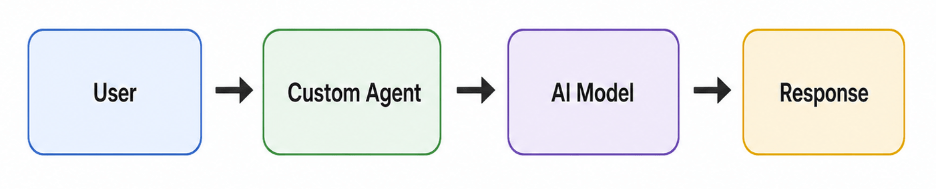
That may be fine for testing, but it is not sufficient for enterprise use.
The issue is that the agent may lack identity, AI audit logging, policy enforcement, and retention. If a user enters confidential client data, employee information, financial details, or legal content, the organization needs a way to monitor and protect that interaction. Without AI compliance monitoring and governance controls, the agent becomes a blind spot.
What Entra Registration Does
Registering the custom agent in Microsoft Entra ID gives it an official identity within the organization.
Instead of existing only as a local app or script, the agent becomes an enterprise application.
This helps the organization understand:
- Which application was used
- Who signed in
- When it was accessed
- What permissions it has
- Which tenant it belongs to
This is the first step toward making the agent secure and manageable. Microsoft Entra authentication helps ensure that only authorized users can access the application, strengthening overall enterprise AI security.
For example, if you build a custom Claude agent with Streamlit, you can register it in Entra so users sign in with their company Microsoft account instead of accessing the app anonymously.
What the Purview SDK Does
Entra gives the agent an identity, but identity alone is not enough.
To make the agent compliance-ready, it must also send AI interaction details to Microsoft Purview.
That is where the Purview SDK or Purview APIs come in.
The SDK can capture and evaluate:
- User prompt
- AI response
- User identity
- Agent name
- Timestamp
- Sensitive data
- Policy result
This enables Microsoft Purview Compliance capabilities to apply controls such as audit logging, Data Loss Prevention (DLP), eDiscovery, retention, and AI risk management.
Simple Architecture:

In this architecture, the user signs in through Entra, allowing the custom agent to identify them. Before or after the prompt reaches the AI model, the Purview SDK checks and records the interaction. The response is then returned to the user, while the compliance record is stored for review.
Why This Matters
Making a custom agent compliance-ready matters because AI conversations may contain sensitive business data.
For example, users may ask the agent to summarize:
- Client contracts
- Employee records
- Financial reports
- Legal documents
- Project documents
- Internal emails
If this information is not monitored, it can create compliance and security risks.
With Microsoft Purview integration and a strong AI governance framework, the organization can answer key questions such as:
- Who used the agent?
- What did the user ask?
- What did the AI respond?
- Was sensitive data shared?
- Was any policy violated?
- Should the interaction be retained?
- Can the interaction be searched later for investigation?
These are the questions auditors, security teams, and compliance teams care about.
Entra Registration Alone Is Not Enough
A common mistake is assuming that registering the app in Entra automatically makes the agent fully compliant. It does not.
Entra registration gives the app an identity, but the agent still must integrate with the Purview SDK or Purview APIs to send prompt and response activity to Microsoft Purview.
The complete process is:
- Register the custom agent in Microsoft Entra
- Enable user sign-in with Entra authentication
- Add Purview SDK or Purview API integration
- Capture prompts and responses
- Send activity to Microsoft Purview
- Apply audit, DLP, retention, and compliance policies
- Review logs in Purview
This approach supports AI data governance, improves visibility, and helps organizations meet regulatory and internal compliance requirements.
Conclusion
A custom AI agent becomes enterprise-ready only when it is secure, traceable, and governed.
Registering the agent in Microsoft Entra ID gives it a trusted identity. Integrating it with the Microsoft Purview SDK enables the organization to capture AI interactions, apply AI compliance policies, perform AI audit logging, monitor user activity, and retain important records.
This turns the custom agent from a simple chatbot into a governed enterprise AI application that supports responsible AI governance and stronger security controls.
For any organization building custom agents with Claude, OpenAI, Azure OpenAI, or other LLMs, this setup is an important step toward responsible AI adoption, AI governance, AI compliance monitoring, and secure enterprise deployment.
Categories
- Accessibility solutions (3)
- AI / LLMOps (AI Observability & Monitoring) (3)
- AI & Automation (17)
- AI Governance & Responsible AI (4)
- AI Security (4)
- Android (17)
- Angular JS (1)
- API & Integration / Developer Tools (1)
- Apple (3)
- Artificial Intelligence (1)
- Artificial Intelligence (AI) (16)
- AV & Collaboration Technology (2)
- AWS Cloud Computing (2)
- AWS DMS (6)
- AWS RDS (12)
- Azure (3)
- BI & ANALYTICS (16)
- Cloud Computing & AI (5)
- Cloud Identity & Directory Services (1)
- Cloud Migration (12)
- Cloud Security & Identity Management (3)
- Company News (5)
- Continuous integration and continuous deployment (2)
- Cybersecurity (7)
- Data Analytics (12)
- Data Engineering (8)
- Data Governance & Compliance (6)
- Data Management (5)
- Data Migration (9)
- Data Quality (1)
- Data Quality & Data Governance (1)
- DBA (10)
- DevOps (1)
- Email Security (1)
- Endpoint Management / Device Management (1)
- Enterprise AI / AI Governance (1)
- Enterprise AI / AI Implementation Best Practices (1)
- Enterprise AI & Intelligent Automation (2)
- Enterprise Mobility & Security (1)
- Enterprise Software Integration / Backend Development (1)
- Enterprise Technology (1)
- Enterprise UX/UI Design (1)
- Goldengate (19)
- Google (2)
- Hadoop (3)
- HPNA (1)
- Ios (10)
- ios 10 (2)
- iPad (3)
- iPhone (3)
- Licensing (7)
- Linux (13)
- Machine Learning Solutions (1)
- Marketing Technology (1)
- Microsoft 365 (1)
- Microsoft 365 Development / APIs (1)
- Microsoft 365 Security & Compliance (4)
- Microsoft Configuration Manager (SCCM / MECM) (1)
- Microsoft Dynamics 365 (4)
- Microsoft Marketplace (1)
- Microsoft Office (5)
- Microsoft Purview (3)
- Microsoft SharePoint & Security (1)
- Microsoft Teams / Collaboration Tools (1)
- Microsoft Teams Security & Compliance (2)
- Mobile (2)
- Network Automation (5)
- Network Security Services (1)
- News (21)
- Operating System (1)
- Oracle (37)
- oracle consulting (3)
- PostgreSQL (1)
- Quantum Computing (1)
- Quickbooks (1)
- SEO (1)
- Software Development (33)
- Systems Automation (2)
- Tech (3)
- Technology (51)
- UI (13)
- Uncategorized (8)
- UX (9)
- VSTO (1)
- Web Development (1)
- Windows (9)
- wordpress (1)