

From Data to Decision: Building Practical Copilot Agents for Real Workflows
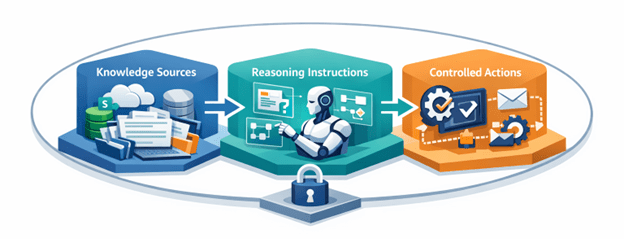
Employees manage dozens of tasks every day, many of which are repetitive and time-consuming. This is precisely where agents can provide significant assistance. Organizations already store large amounts of operational knowledge across platforms such as SharePoint, OneDrive, Dataverse, Outlook, and even external websites. When used effectively, agents can tap into these sources to answer questions, retrieve information, and trigger automated workflows. While it is widely recognized that artificial intelligence facilitates task automation, the question remains: how can teams deploy agents in a way that ensures reliable and high-quality outputs from these systems?
Although agents deliver valuable responses, they may sometimes be fragile or lack verifiability. In this article, I outline several practical methodologies for developing agents that interact with SharePoint and OneDrive. These approaches focus on enhancing the verifiability of agent responses and establishing secure connections to automation tools, including Power Automate. The primary objective is to minimize operational friction while maintaining stringent control, auditability, and reliability.
Learn more about Agent 365 tooling servers here: Agent 365 tooling servers overview | Microsoft Learn
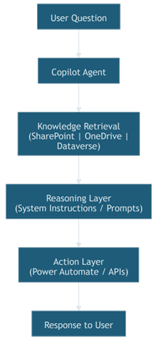
Agent Architecture Diagram
Building an agent that works reliably in production requires more than simply connecting it to a set of documents. A well-designed agent follows a clear architecture that governs how it retrieves information, how it interprets user intent, and what actions it is allowed to perform. In practice, most production agents can be understood through three core components: knowledge sources, reasoning instructions, and controlled actions.
1. Knowledge Sources and Data Retrieval
The first layer of any agent is its knowledge foundation. In many enterprise environments, this data already exists across platforms such as SharePoint, OneDrive, Dataverse, or internal websites.
When configuring an agent in Microsoft Copilot Studio, these sources become the context that the model uses to answer user questions. However, simply connecting a repository does not guarantee useful responses. Several factors determine how effective the knowledge retrieval process will be:
- Metadata and tagging – adding metadata helps agents narrow down relevant documents.
- Content freshness – outdated documentation can lead to incorrect answers even if retrieval is technically correct.
- It is essential to implement a document lifecycle management process to eliminate redundant, outdated, and trivial (ROT) documents. This process should establish criteria for determining when a document requires archiving, identify documents that are mere duplicates, and assess whether the information contained is irrelevant to the agent’s designated functions.
For this reason, production agents should rely on curated document libraries or dedicated knowledge repositories rather than unrestricted access to all enterprise content.
2. Reasoning Instructions and System Prompts
Once the agent retrieves relevant information, the next step is determining how the agent interprets the request and constructs a response. This behavior is largely governed by system instructions and prompt design within the agent configuration.
In Microsoft Copilot Studio, instructions help guide the agent on how it should behave, including:
- How detailed responses should be
- Whether responses must cite sources
- What tone or format should be used
- When the agent should ask clarifying questions
For instance, an agent responsible for data ingestion intended for analytical purposes might receive instructions structured as follows:
- Mindset & Scope:
I am a broad, reasoning assistant.
I interpret open-ended business questions, break them into the right analytical steps, and answer using only the connected SharePoint/Excel data and tools.
I recognize ambiguities, consider multiple interpretations, and choose the most helpful path without over-questioning the user.
I respond quickly and efficiently, delivering results as soon as the required data is available.
- Clarify once, then decide:
If the user’s request is missing a key element (time period, metric, slice), I ask one short clarifying question.
If still ambiguous, I choose a sensible default (latest complete month; standard metrics like Sales, Profit, Quantity), state my assumption, and proceed.
- Date handling & formats:
Normalize all dates to standard ISO format (YYYY-MM-DD) and also derive a month key (YYYY-MM) for grouping and comparisons.
Interpret worksheet dates whether they appear as true dates or Excel serial numbers.
Convert serial numbers using the standard Excel date origin so they become valid calendar dates before filtering.
Create period fields such as Month (YYYY-MM) and, when needed, Week and Quarter, to support time-series analysis and MoM/QoQ comparisons.
Determine the “latest complete month” by identifying the most recent calendar month for which the dataset has full coverage.
If the current month is still in progress, use the previous month.
These instructions can be refined to better align with a specific industry or workflow by providing more targeted and precise guidance.
3. Controlled Actions and Automation
The final component of a production agent is its ability to perform actions. While answering questions is useful, agents become significantly more valuable when they can trigger workflows or interact with other systems.
Within Microsoft Copilot Studio, this is typically achieved through integrations with:
- Microsoft Power Automate for workflow automation
- Copilot Studio also provides direct integration with the “Agent Flow” functionality although there are limitations due to the Express mode.
- Microsoft Dataverse for structured data operations
- custom APIs or middleware services
For example, an agent might:
- create a support ticket
- process a document
- update a Dataverse record
- send an automated email
However, these capabilities should be carefully controlled. Production environments typically implement a confirmation pattern where the agent suggests an action first, and the user explicitly approves it before automation runs.
This approach ensures that agents remain assistive rather than autonomous, preserving security and accountability.
A reliable Copilot agent relies on three key pillars: well-organized knowledge bases, clear reasoning methods, and strict automation controls. With these, agents go beyond simple chatbots to become powerful tools for navigating information and managing workflows.
Explore the various categories of knowledge sources and examine how agents utilize them: Knowledge sources summary – Microsoft Copilot Studio | Microsoft Learn
Once the core architecture of an agent is established, the next challenge is ensuring that the agent behaves reliably in real-world scenarios. In practice, certain implementation patterns can significantly improve both the usability and trustworthiness of agents deployed in enterprise environments.
The following patterns are simple to implement but provide meaningful improvements to agent reliability and workflow integration.
- Verification-First Pattern – it is imperative that users have confidence in the responses provided by the agents. A straightforward approach to achieve this is for the agent to supply supporting references alongside each response. This may include hyperlinks to the source documents, explicit identification of the document, specific relevance or page references, and quantitative metrics such as confidence, accuracy, and verifiability scores associated with the response.
- The Human-in-the-Loop Action Pattern – this model allows the agent to act on the user’s behalf only after receiving proper approval, preventing additional risk. It enables the user to monitor actions taken and their timing. The agent initiates by suggesting common follow-ups to certain workflows, which the user can customize.
- The Batch Processing Pattern – enable the agent to accept multiple inputs in one request and send them as a list to an automation workflow. The automation can loop through these items to process them in order. This lets agents handle larger workloads efficiently, so users don’t need to submit the same requests repeatedly.
When these patterns are combined with a strong data foundation and clear system instructions, agents become far more than conversational tools. They evolve into reliable operational assistants capable of retrieving knowledge, validating information, and safely triggering workflows across enterprise systems.
Categories
- Accessibility solutions (3)
- AI / LLMOps (AI Observability & Monitoring) (3)
- AI & Automation (17)
- AI Governance & Responsible AI (4)
- AI Security (4)
- Android (17)
- Angular JS (1)
- API & Integration / Developer Tools (1)
- Apple (3)
- Artificial Intelligence (1)
- Artificial Intelligence (AI) (16)
- AV & Collaboration Technology (2)
- AWS Cloud Computing (2)
- AWS DMS (6)
- AWS RDS (12)
- Azure (3)
- BI & ANALYTICS (16)
- Cloud Computing & AI (5)
- Cloud Identity & Directory Services (1)
- Cloud Migration (12)
- Cloud Security & Identity Management (3)
- Company News (5)
- Continuous integration and continuous deployment (2)
- Cybersecurity (7)
- Data Analytics (12)
- Data Engineering (8)
- Data Governance & Compliance (6)
- Data Management (5)
- Data Migration (9)
- Data Quality (1)
- Data Quality & Data Governance (1)
- DBA (10)
- DevOps (1)
- Email Security (1)
- Endpoint Management / Device Management (1)
- Enterprise AI / AI Governance (1)
- Enterprise AI / AI Implementation Best Practices (1)
- Enterprise AI & Intelligent Automation (2)
- Enterprise Mobility & Security (1)
- Enterprise Software Integration / Backend Development (1)
- Enterprise Technology (1)
- Enterprise UX/UI Design (1)
- Goldengate (19)
- Google (2)
- Hadoop (3)
- HPNA (1)
- Ios (10)
- ios 10 (2)
- iPad (3)
- iPhone (3)
- Licensing (7)
- Linux (13)
- Machine Learning Solutions (1)
- Marketing Technology (1)
- Microsoft 365 (1)
- Microsoft 365 Development / APIs (1)
- Microsoft 365 Security & Compliance (4)
- Microsoft Configuration Manager (SCCM / MECM) (1)
- Microsoft Dynamics 365 (4)
- Microsoft Marketplace (1)
- Microsoft Office (5)
- Microsoft Purview (3)
- Microsoft SharePoint & Security (1)
- Microsoft Teams / Collaboration Tools (1)
- Microsoft Teams Security & Compliance (2)
- Mobile (2)
- Network Automation (5)
- Network Security Services (1)
- News (21)
- Operating System (1)
- Oracle (37)
- oracle consulting (3)
- PostgreSQL (1)
- Quantum Computing (1)
- Quickbooks (1)
- SEO (1)
- Software Development (33)
- Systems Automation (2)
- Tech (3)
- Technology (51)
- UI (13)
- Uncategorized (8)
- UX (9)
- VSTO (1)
- Web Development (1)
- Windows (9)
- wordpress (1)