

Components in Ataccama
What Are Ataccama Components?
Ataccama Components are reusable files in Ataccama ONE and Ataccama ONE Desktop designed to manage different types of data quality operations, including validation, transformation, and post-processing tasks. These components help organizations automate data validation, improve data quality management, and streamline enterprise data workflows.
Ataccama Components are divided into three primary categories:
Validation Components
Ataccama Validation Components verify whether loaded data meets predefined data quality rules and compliance standards. These components help identify invalid records, missing values, incorrect formats, and rule violations before data moves to downstream systems.
Validation Components can:
- Check data against business rules and quality standards
- Detect invalid or incomplete values
- Send notifications when data quality issues occur
- Highlight records that fail validation checks
- Improve overall data quality monitoring
Transformation Components
Ataccama Transformation Components create and manage Virtual Catalog Items (VCIs) that represent transformed or derived data attributes. These components define how raw data should be modified, standardized, enriched, or restructured for analytics and operational use cases.
Transformation Components are commonly used for:
- Data standardization
- Data enrichment
- Attribute restructuring
- Creating derived fields
- Managing Virtual Catalog Items in Ataccama
Post-Processing Components
Ataccama Post-Processing Components execute final data processing actions after validation and transformation workflows are completed. These components help optimize datasets before they reach target systems or reporting environments.
Post-processing tasks include:
- Deduplication
- Record management
- Final quality checks
- Data optimization
- Post-processing plan execution
Where to Find Components in Ataccama ONE
In Ataccama ONE, navigate to:
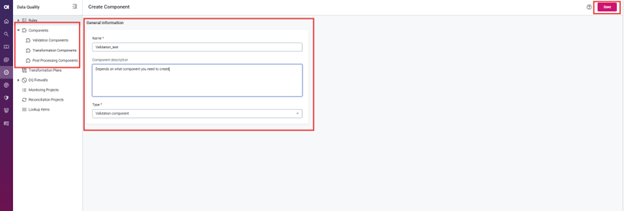
Data Quality > Components
This section displays a complete list of all available components organized by type.
The Components screen contains three major sections:
Validation Components
These components are created and managed directly in Ataccama ONE and are primarily used for implementing reusable data validation rules.
Transformation Components
These components are created in Ataccama ONE Desktop and are used to create and manage Virtual Catalog Items (VCIs) and transformation logic.
Post-Processing Components
These components are also created in Ataccama ONE Desktop and support advanced post-processing plans and data optimization workflows.
Validation Components in Ataccama: How to Create and Use
Step 1: Create a Validation Component in Ataccama ONE
To create a new Ataccama Validation Component:
- Go to Data Quality > Components
- Click Create
- Enter the following details:
- Name
- Description (Optional)
- Type: Validation Component
- Click Save
This creates the component in Draft status.
Step 2: Define Validation Logic
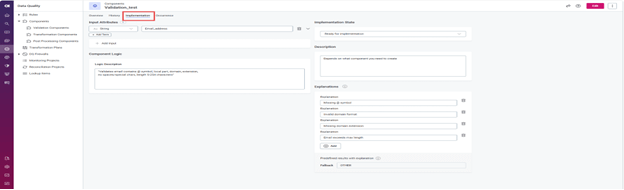
Open the Implementation tab and configure the component settings.
Add Input Attributes
Define the data types and attributes the component will receive during execution.
Define Component Logic
Document the validation logic clearly so users working in Ataccama ONE Desktop understand how the component behaves.
Examples include:
- Email format validation
- Mandatory field checks
- Data conformity validation
- Duplicate record validation
Configure Explanations
Add explanations that describe why a validation rule fails.
Examples:
- Missing @ symbol
- Invalid date format
- Null value detected
- Duplicate customer ID
These explanations improve data quality monitoring and help users quickly identify validation issues.
Set Implementation State
Change the implementation state to:
Ready for Implementation
After configuration is complete, click Publish.
Step 3: Create a Rule Using the Validation Component
To use the component inside a Data Quality Rule:
- Navigate to Data Quality > Rules
- Click Create
- Open the Implementation tab
Configure Rule Settings
- Select the appropriate Rule Type
- Completeness
- Conformance
- Validity
- Uniqueness
- Add Input Attributes
- Ensure attribute data types match the component inputs
Select Component-Based Logic
- Change Rule Logic to:
Component
- Select the required Ataccama Component from the list
- Map rule attributes to component input attributes
Map Explanations to Results
Assign explanations to validation outcomes so failed records display meaningful error messages during execution.
Finally, click Publish to activate the rule.
Benefits of Using Ataccama Components
Using reusable Ataccama ONE Components improves scalability, consistency, and automation across enterprise data quality processes.
Key benefits include:
- Faster implementation of data quality rules
- Reusable validation and transformation logic
- Improved data governance
- Better data monitoring and reporting
- Reduced manual processing effort
- Consistent enterprise-wide data standards
Organizations using Ataccama Data Quality Components can significantly improve operational efficiency while maintaining accurate and reliable business data.
Categories
- Accessibility solutions (3)
- AI / LLMOps (AI Observability & Monitoring) (3)
- AI & Automation (17)
- AI Governance & Responsible AI (4)
- AI Security (4)
- Android (17)
- Angular JS (1)
- API & Integration / Developer Tools (1)
- Apple (3)
- Artificial Intelligence (1)
- Artificial Intelligence (AI) (16)
- AV & Collaboration Technology (2)
- AWS Cloud Computing (2)
- AWS DMS (6)
- AWS RDS (12)
- Azure (3)
- BI & ANALYTICS (16)
- Cloud Computing & AI (5)
- Cloud Identity & Directory Services (1)
- Cloud Migration (12)
- Cloud Security & Identity Management (3)
- Company News (5)
- Continuous integration and continuous deployment (2)
- Cybersecurity (7)
- Data Analytics (12)
- Data Engineering (8)
- Data Governance & Compliance (6)
- Data Management (5)
- Data Migration (9)
- Data Quality (1)
- Data Quality & Data Governance (1)
- DBA (10)
- DevOps (1)
- Email Security (1)
- Endpoint Management / Device Management (1)
- Enterprise AI / AI Governance (1)
- Enterprise AI / AI Implementation Best Practices (1)
- Enterprise AI & Intelligent Automation (2)
- Enterprise Mobility & Security (1)
- Enterprise Software Integration / Backend Development (1)
- Enterprise Technology (1)
- Enterprise UX/UI Design (1)
- Goldengate (19)
- Google (2)
- Hadoop (3)
- HPNA (1)
- Ios (10)
- ios 10 (2)
- iPad (3)
- iPhone (3)
- Licensing (7)
- Linux (13)
- Machine Learning Solutions (1)
- Marketing Technology (1)
- Microsoft 365 (1)
- Microsoft 365 Development / APIs (1)
- Microsoft 365 Security & Compliance (4)
- Microsoft Configuration Manager (SCCM / MECM) (1)
- Microsoft Dynamics 365 (4)
- Microsoft Marketplace (1)
- Microsoft Office (5)
- Microsoft Purview (3)
- Microsoft SharePoint & Security (1)
- Microsoft Teams / Collaboration Tools (1)
- Microsoft Teams Security & Compliance (2)
- Mobile (2)
- Network Automation (5)
- Network Security Services (1)
- News (21)
- Operating System (1)
- Oracle (37)
- oracle consulting (3)
- PostgreSQL (1)
- Quantum Computing (1)
- Quickbooks (1)
- SEO (1)
- Software Development (33)
- Systems Automation (2)
- Tech (3)
- Technology (51)
- UI (13)
- Uncategorized (8)
- UX (9)
- VSTO (1)
- Web Development (1)
- Windows (9)
- wordpress (1)