

Case Study into Document Extraction Pipeline with AI Builder
Learn how AI Builder, Power Automate, and Copilot Studio were used to build a scalable document extraction pipeline for processing multi-vendor compliance PDFs within the Microsoft Power Platform ecosystem. This case study explores how organizations can streamline AI-powered document extraction, automate workflows, and improve operational efficiency using intelligent document processing solutions.
The Challenge of Multi-Vendor PDF Processing
Many industries depend on vendor-issued documents that follow no standard structure. A supplier delivers a product alongside a compliance or quality document — often referred to as a Certificate of Analysis (COA) — containing critical business data such as lot numbers, manufacturing dates, test results, and compliance metrics.
The complexity grows when organizations handle documents from multiple vendors, each using different layouts, page lengths, and field structures. Some PDFs may contain only a few required fields, while others span dozens of pages with varying formats. This creates a major challenge for automated PDF data extraction and enterprise-scale document processing workflows.
This project demonstrates how AI Builder, Power Automate, and Copilot Studio were used to create an AI document processing workflow capable of handling multi-vendor compliance PDFs while highlighting the scalability limitations encountered during implementation.
How the AI Builder Document Extraction Pipeline Works
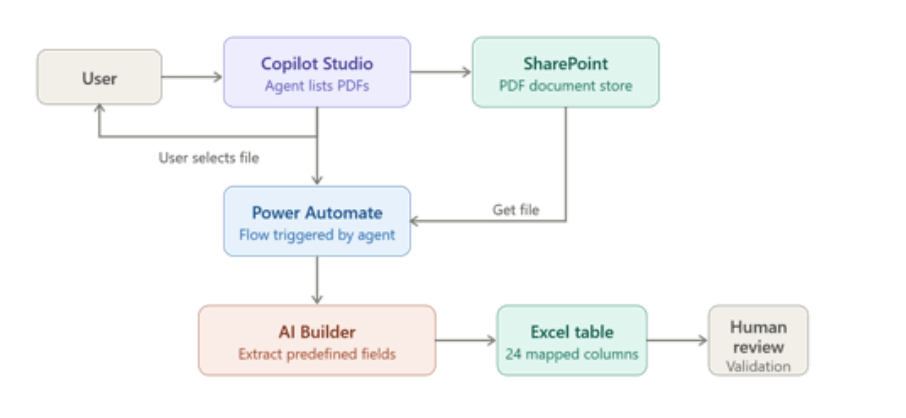
The solution uses a Copilot Studio agent integrated with a SharePoint document library containing incoming compliance PDFs. Users interact with the agent through a conversational interface to retrieve and select files for processing.
Once a file is selected, the system triggers a Power Automate document processing workflow that:
- Retrieves the PDF from SharePoint
- Uses an AI Builder document extraction model to identify predefined fields
- Maps extracted values into an Excel table
- Sends the output for human validation before downstream processing
This architecture provides a fully integrated Power Platform document automation solution capable of rapid deployment without custom connectors or external integrations.
Where AI Builder Works Well for Document Extraction
AI Builder performs effectively when documents follow predictable layouts and structured patterns. Common use cases include:
- Invoice processing
- Purchase order automation
- Employee onboarding forms
- Expense report automation
- Identity document verification
- Healthcare intake forms
For organizations managing standardized documents, AI Builder PDF extraction simplifies data capture and reduces manual processing effort. Native integration with Power Automate allows extracted values to flow directly into workflows without additional development work.
Copilot Studio further improves usability by enabling natural-language interaction for document retrieval and workflow execution, helping teams manage enterprise document automation more efficiently.
When document templates remain stable and field mappings are predictable, AI Builder delivers reliable OCR automation with Power Automate and simplifies ongoing maintenance.
Scalability Challenges with AI Builder
While AI Builder is effective for structured forms, large-scale multi-vendor PDF processing introduces several operational and scalability challenges.
- Low Confidence Scores Across Different Templates
Training a single model on multiple document structures reduces extraction accuracy. Since vendors use different layouts and many fields appear inconsistently across files, the model often attempts to locate fields that do not exist in every document. This impacts confidence scores and reduces extraction reliability.
For organizations handling highly variable compliance documents, this becomes a significant limitation for scalable AI-powered document extraction.
- No Support for Multiple Values per Field
One major limitation in AI Builder is the inability to capture repeated parameter values within the same document.
For example, if a Certificate of Analysis contains multiple test results for the same parameter, AI Builder can only return one extracted value. This creates challenges for industries where repeated measurements are critical for compliance validation and quality assurance.
This restriction limits the flexibility of intelligent document processing workflows in enterprise environments.
- Limited Output Customization
The extracted output generated by AI Builder is fixed and requires additional manual logic in Power Automate for formatting, normalization, and routing. There is no built-in post-processing capability within the extraction model itself.
As the number of vendors and mapped fields increases, maintaining these workflows becomes increasingly difficult. Large-scale document extraction workflows may require additional automation layers or Azure-based processing solutions for long-term scalability.
- Manual Mapping Does Not Scale Efficiently
Every new vendor template requires retraining the extraction model and extending Power Automate mapping logic. Adding vendors becomes a development effort rather than a simple configuration update.
For businesses expecting ongoing growth in document volume and vendor diversity, this creates a long-term maintenance challenge for enterprise document processing systems.
Key Takeaways from the AI Builder Implementation
This project highlighted several important lessons about using AI Builder for document automation within the Microsoft Power Platform ecosystem:
- AI Builder performs best with structured and predictable document formats
- Multi-vendor document extraction increases maintenance complexity
- Power Automate helps orchestrate workflows but requires extensive manual mapping
- Large-scale compliance document automation may require Azure-based document intelligence solutions for better scalability and flexibility
As document variability increases, maintaining scalable workflows becomes more difficult. Repeated values, inconsistent layouts, and growing mapping requirements can quickly make traditional Power Automate workflows harder to manage.
This case study demonstrates that AI Builder is highly effective for structured document extraction using AI Builder, but organizations planning enterprise-scale automation should evaluate more advanced architectures for long-term scalability, normalization, and intelligent processing capabilities.
Categories
- Accessibility solutions (3)
- AI / LLMOps (AI Observability & Monitoring) (3)
- AI & Automation (17)
- AI Governance & Responsible AI (4)
- AI Security (4)
- Android (17)
- Angular JS (1)
- API & Integration / Developer Tools (1)
- Apple (3)
- Artificial Intelligence (1)
- Artificial Intelligence (AI) (16)
- AV & Collaboration Technology (2)
- AWS Cloud Computing (2)
- AWS DMS (6)
- AWS RDS (12)
- Azure (3)
- BI & ANALYTICS (16)
- Cloud Computing & AI (5)
- Cloud Identity & Directory Services (1)
- Cloud Migration (12)
- Cloud Security & Identity Management (3)
- Company News (5)
- Continuous integration and continuous deployment (2)
- Cybersecurity (7)
- Data Analytics (12)
- Data Engineering (8)
- Data Governance & Compliance (6)
- Data Management (5)
- Data Migration (9)
- Data Quality (1)
- Data Quality & Data Governance (1)
- DBA (10)
- DevOps (1)
- Email Security (1)
- Endpoint Management / Device Management (1)
- Enterprise AI / AI Governance (1)
- Enterprise AI / AI Implementation Best Practices (1)
- Enterprise AI & Intelligent Automation (2)
- Enterprise Mobility & Security (1)
- Enterprise Software Integration / Backend Development (1)
- Enterprise Technology (1)
- Enterprise UX/UI Design (1)
- Goldengate (19)
- Google (2)
- Hadoop (3)
- HPNA (1)
- Ios (10)
- ios 10 (2)
- iPad (3)
- iPhone (3)
- Licensing (7)
- Linux (13)
- Machine Learning Solutions (1)
- Marketing Technology (1)
- Microsoft 365 (1)
- Microsoft 365 Development / APIs (1)
- Microsoft 365 Security & Compliance (4)
- Microsoft Configuration Manager (SCCM / MECM) (1)
- Microsoft Dynamics 365 (4)
- Microsoft Marketplace (1)
- Microsoft Office (5)
- Microsoft Purview (3)
- Microsoft SharePoint & Security (1)
- Microsoft Teams / Collaboration Tools (1)
- Microsoft Teams Security & Compliance (2)
- Mobile (2)
- Network Automation (5)
- Network Security Services (1)
- News (21)
- Operating System (1)
- Oracle (37)
- oracle consulting (3)
- PostgreSQL (1)
- Quantum Computing (1)
- Quickbooks (1)
- SEO (1)
- Software Development (33)
- Systems Automation (2)
- Tech (3)
- Technology (51)
- UI (13)
- Uncategorized (8)
- UX (9)
- VSTO (1)
- Web Development (1)
- Windows (9)
- wordpress (1)