

Azure Content Understanding Prebuilt Analyzers vs SharePoint Knowledge Source in Copilot Studio
Learn why Azure Content Understanding, Microsoft Copilot Studio, and its prebuilt-documentSearch, prebuilt-imageSearch, and prebuilt-videoSearch analyzers outperform a SharePoint Knowledge Source for Copilot Studio agents handling complex, multi-modal queries and enterprise AI search requirements.
Developing a Microsoft Copilot Studio agent with a SharePoint document library usually means uploading documents, setting the library as a knowledge source, and letting the agent answer queries. This works well for simple keyword searches in organized documents but falls short for semantic search, complex reasoning, and AI-powered document search across varied content—such as filtering by location, analyzing images, or extracting topics from training videos.
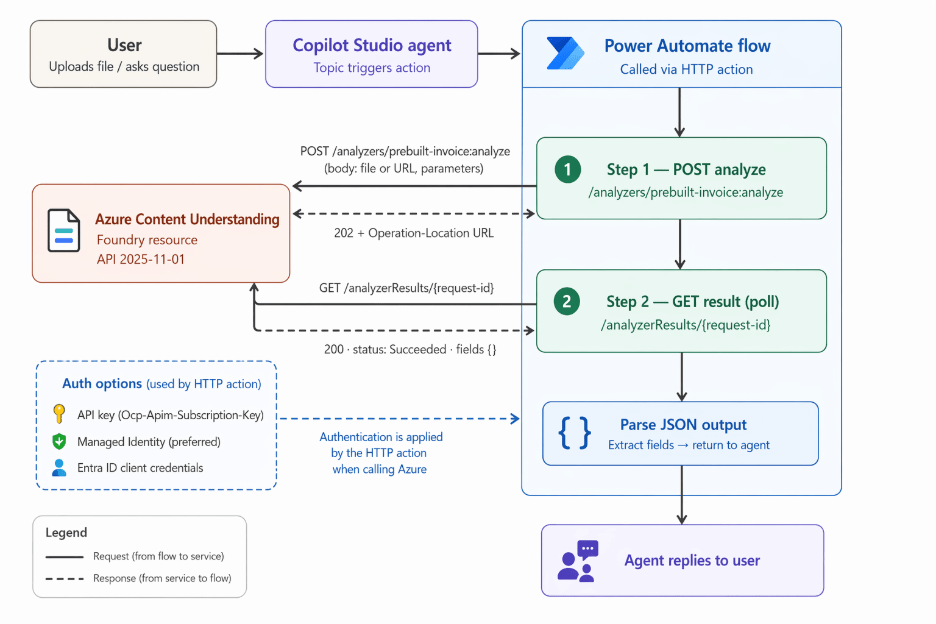
This article reviews the limits of the SharePoint Knowledge Source model and shows how adding Azure Content Understanding prebuilt analyzers through Power Automate integration in a Copilot Studio agent addresses these challenges. It focuses on analyzer capabilities, integration methods, and query scenarios that support advanced enterprise knowledge management beyond standard SharePoint retrieval.
Why the SharePoint Knowledge Source Has a Hard Ceiling
Configuring a SharePoint site as a knowledge source in Microsoft Copilot Studio allows the platform to index text from documents and return ranked matches for queries. Extraction is straightforward and works well with Word and PDF content, but it does not process images or support video analysis.
The limitation goes beyond file formats. Even with supported documents, the system relies heavily on keyword matching instead of semantic document search. For example, a query such as “show me inspection reports flagging ventilation deficiencies at the Manchester facility” may not return relevant content if the exact term “ventilation” does not appear, even when the document discusses the issue using different terminology.
Metadata tagging can improve results. A structured SharePoint library with consistent fields such as site, date, type, and category can narrow search results before text matching occurs. However, metadata quality often declines over time, varies across contributors, and becomes difficult to manage at scale. Azure Content Understanding improves AI knowledge management by extracting structured information directly from files, reducing dependence on manual tagging and supporting more effective enterprise AI search.
The limitations become most apparent in three content scenarios, each addressed by a dedicated prebuilt analyzer.
prebuilt-documentSearch: Semantic Retrieval Over Documents
The SharePoint knowledge source performs surface-level text matching. prebuilt-documentSearch generates output designed for Retrieval Augmented Generation (RAG) and language model consumption, including a structured Markdown representation of the document, chart.js and mermaid.js renderings of embedded visuals, descriptions of handwritten annotations, and a concise semantic summary.
That semantic summary is the key differentiator. When a Power Automate integration passes this information into the Copilot Studio context window, the agent can reason over document meaning rather than simply matching keywords. Queries that often fail within a traditional SharePoint document library, such as filtering inspection reports by facility and issue type, can be resolved more accurately because the summary highlights the document’s intent and context regardless of exact terminology.
This approach strengthens AI-powered search, semantic search, and document retrieval AI capabilities across large document repositories.
prebuilt-imageSearch: Querying Visual Content in SharePoint
Images, scanned forms, and technical diagrams are invisible to a standard SharePoint knowledge source. prebuilt-imageSearch accepts an image URL and returns a natural language description of the image content.
When stored alongside file references in Dataverse or SharePoint lists, these descriptions make visual assets searchable through AI document search and semantic search techniques. Organizations can run queries such as “find site photos showing forklift activity near the loading dock” even when the original files are tagged only by date and location.
For businesses implementing enterprise knowledge management and multimodal AI solutions, this capability significantly improves access to visual information that would otherwise remain undiscoverable.
prebuilt-videoSearch: Making Recordings Retrievable
Video content has virtually no searchable surface within a standard SharePoint knowledge source. prebuilt-videoSearch automatically segments recordings by topic and scene, generating a timestamped transcript with speaker labels, visual summaries for each segment, and keyframe extractions.
A recommended implementation pattern is index-on-ingest. A Power Automate integration flow triggered by file uploads submits videos for analysis, polls analyzer results until processing is complete, and writes segment information into Dataverse. The Copilot Studio agent then queries the indexed content at runtime rather than initiating analysis for every user request.
This method transforms video assets into searchable resources and supports enterprise AI search, video content analysis AI, and multimodal knowledge management initiatives.
SharePoint remains a practical starting point for Microsoft Copilot Studio agents working with text-based and well-structured document libraries. However, it struggles to support mixed-media content, cross-file semantic search, and natural language filtering beyond traditional SharePoint metadata.
Azure Content Understanding’s RAG-optimized analyzers—prebuilt-documentSearch, prebuilt-imageSearch, and prebuilt-videoSearch—provide structured, semantically rich content that enables agents to work effectively with documents, images, and videos. Combined with Power Automate integration, these analyzers transform a standard SharePoint document library into a scalable, AI-powered knowledge base capable of supporting modern enterprise knowledge management and AI-powered search experiences.
Categories
- Accessibility solutions (3)
- AI / LLMOps (AI Observability & Monitoring) (3)
- AI & Automation (17)
- AI Governance & Responsible AI (4)
- AI Security (4)
- Android (17)
- Angular JS (1)
- API & Integration / Developer Tools (1)
- Apple (3)
- Artificial Intelligence (1)
- Artificial Intelligence (AI) (16)
- AV & Collaboration Technology (2)
- AWS Cloud Computing (2)
- AWS DMS (6)
- AWS RDS (12)
- Azure (3)
- BI & ANALYTICS (16)
- Cloud Computing & AI (5)
- Cloud Identity & Directory Services (1)
- Cloud Migration (12)
- Cloud Security & Identity Management (3)
- Company News (5)
- Continuous integration and continuous deployment (2)
- Cybersecurity (7)
- Data Analytics (12)
- Data Engineering (8)
- Data Governance & Compliance (6)
- Data Management (5)
- Data Migration (9)
- Data Quality (1)
- Data Quality & Data Governance (1)
- DBA (10)
- DevOps (1)
- Email Security (1)
- Endpoint Management / Device Management (1)
- Enterprise AI / AI Governance (1)
- Enterprise AI / AI Implementation Best Practices (1)
- Enterprise AI & Intelligent Automation (2)
- Enterprise Mobility & Security (1)
- Enterprise Software Integration / Backend Development (1)
- Enterprise Technology (1)
- Enterprise UX/UI Design (1)
- Goldengate (19)
- Google (2)
- Hadoop (3)
- HPNA (1)
- Ios (10)
- ios 10 (2)
- iPad (3)
- iPhone (3)
- Licensing (7)
- Linux (13)
- Machine Learning Solutions (1)
- Marketing Technology (1)
- Microsoft 365 (1)
- Microsoft 365 Development / APIs (1)
- Microsoft 365 Security & Compliance (4)
- Microsoft Configuration Manager (SCCM / MECM) (1)
- Microsoft Dynamics 365 (4)
- Microsoft Marketplace (1)
- Microsoft Office (5)
- Microsoft Purview (3)
- Microsoft SharePoint & Security (1)
- Microsoft Teams / Collaboration Tools (1)
- Microsoft Teams Security & Compliance (2)
- Mobile (2)
- Network Automation (5)
- Network Security Services (1)
- News (21)
- Operating System (1)
- Oracle (37)
- oracle consulting (3)
- PostgreSQL (1)
- Quantum Computing (1)
- Quickbooks (1)
- SEO (1)
- Software Development (33)
- Systems Automation (2)
- Tech (3)
- Technology (51)
- UI (13)
- Uncategorized (8)
- UX (9)
- VSTO (1)
- Web Development (1)
- Windows (9)
- wordpress (1)