

Ataccama ONE Import Export: Data Quality Rule Migration Guide
Moving Data Quality Rules Across Environments in Ataccama ONE
Every mature data governance framework operates across multiple environments. Teams build and refine data quality rules in sandbox environments, validate them in testing, and then promote them to production. However, this transition is often one of the most error-prone steps in any data governance workflow.
Ataccama ONE addresses this challenge through a structured import and export framework, making it easier to manage data quality rule lifecycle management across environments. This approach creates a repeatable and controlled process for moving metadata, rules, and glossary terms without introducing risk.
How Export Plans Work in Ataccama ONE
Export plans are JSON-based configurations that define what metadata gets transferred between environments. They help teams standardize metadata management and ensure only the required assets are included in the migration.
Out-of-the-box export plans in Ataccama ONE cover:
- Business glossary terms
- Data quality rules
- Reference data
- Data lineage repositories
Teams can also create custom export plans to support specific data governance best practices and align with their internal promotion workflows.
Step-by-Step: Export and Import Data Quality Rules
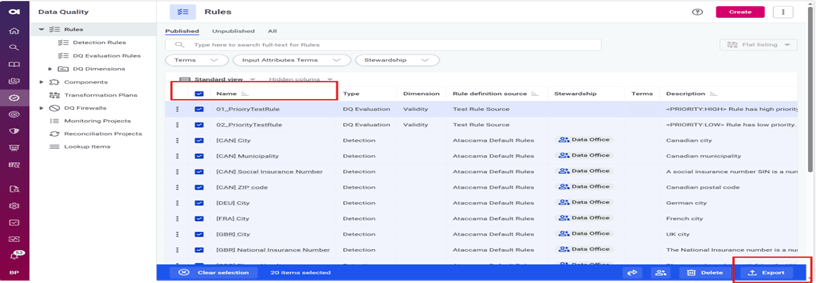
Export from Source Environment
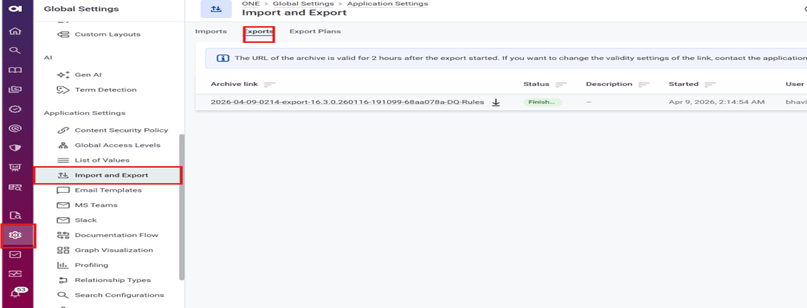
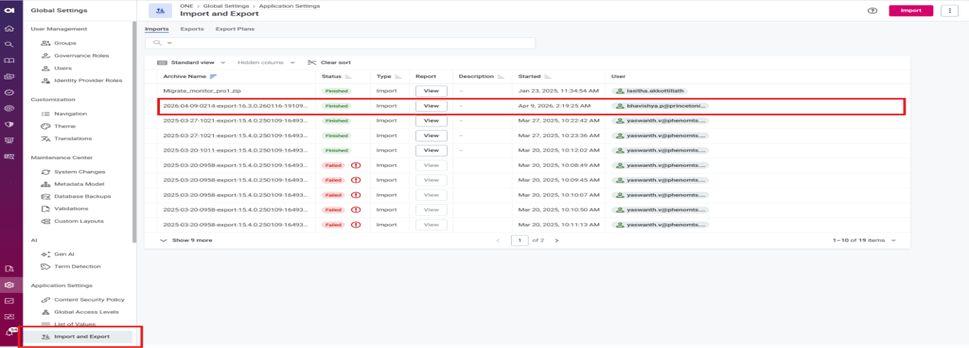
- Navigate to Global Settings → Application Settings → Import and Export
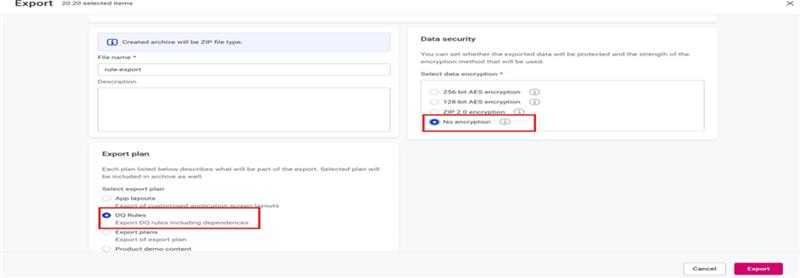
- Create a new export and select the appropriate export plan
- Choose encryption settings (use AES-256 encryption for secure transfers across environments)
- Run the export and download the ZIP file from the Notification Center
Import into Target Environment
- Open Import and Export in the target instance
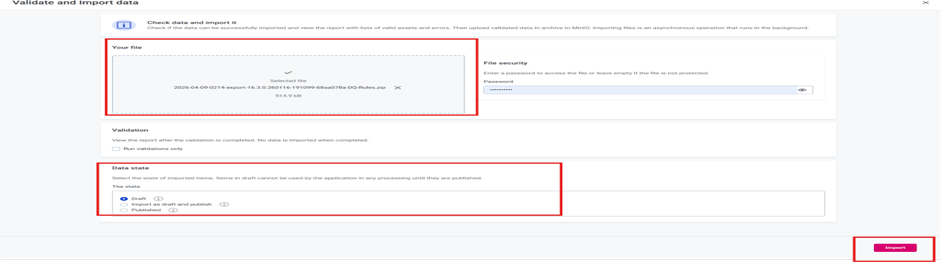
- Upload the exported ZIP archive
- Enter the password if encryption was applied
- Run validation before deployment to identify conflicts or missing dependencies
- Choose import mode:
- Draft (recommended for production validation)
- Published (for direct deployment)
This validation-first approach supports reliable data quality rule validation and prevents errors during production rollout.
Key Considerations for Rule Migration
Validate Before Promotion
Asset IDs, such as DQ dimension IDs, may differ across environments. Always validate to avoid broken references and ensure smooth data governance environment migration.
Avoid Migrating Environment-Specific Data
Data source connections and profiling results should remain within their original environments. Focus on migrating only data quality management configurations and metadata.
Use Monitoring Lifecycle Instead of Direct Migration
Monitoring projects should follow a structured lifecycle rather than direct export/import. This ensures proper mapping between development and production datasets within your enterprise data governance setup.
Why This Matters for Data Governance
A structured approach to migrating data quality rules is essential for maintaining consistency and trust in your data. Without it, organizations risk introducing inconsistencies, broken dependencies, and governance gaps.
With Ataccama ONE, teams can:
- Standardize data governance workflows
- Improve data quality automation
- Reduce deployment errors
- Ensure consistent rule enforcement across environments
Final Thoughts
Moving rules between environments doesn’t have to be a risky process. With a well-defined import and export process in Ataccama ONE, organizations can turn environment promotion into a predictable and controlled step in their data governance strategy.
By combining structured export plans, strong validation practices, and clear governance policies, teams can confidently manage data quality rules across environments—without compromising accuracy or control.
Categories
- Accessibility solutions (3)
- AI / LLMOps (AI Observability & Monitoring) (3)
- AI & Automation (17)
- AI Governance & Responsible AI (4)
- AI Security (4)
- Android (17)
- Angular JS (1)
- API & Integration / Developer Tools (1)
- Apple (3)
- Artificial Intelligence (1)
- Artificial Intelligence (AI) (16)
- AV & Collaboration Technology (2)
- AWS Cloud Computing (2)
- AWS DMS (6)
- AWS RDS (12)
- Azure (3)
- BI & ANALYTICS (16)
- Cloud Computing & AI (5)
- Cloud Identity & Directory Services (1)
- Cloud Migration (12)
- Cloud Security & Identity Management (3)
- Company News (5)
- Continuous integration and continuous deployment (2)
- Cybersecurity (7)
- Data Analytics (12)
- Data Engineering (8)
- Data Governance & Compliance (6)
- Data Management (5)
- Data Migration (9)
- Data Quality (1)
- Data Quality & Data Governance (1)
- DBA (10)
- DevOps (1)
- Email Security (1)
- Endpoint Management / Device Management (1)
- Enterprise AI / AI Governance (1)
- Enterprise AI / AI Implementation Best Practices (1)
- Enterprise AI & Intelligent Automation (2)
- Enterprise Mobility & Security (1)
- Enterprise Software Integration / Backend Development (1)
- Enterprise Technology (1)
- Enterprise UX/UI Design (1)
- Goldengate (19)
- Google (2)
- Hadoop (3)
- HPNA (1)
- Ios (10)
- ios 10 (2)
- iPad (3)
- iPhone (3)
- Licensing (7)
- Linux (13)
- Machine Learning Solutions (1)
- Marketing Technology (1)
- Microsoft 365 (1)
- Microsoft 365 Development / APIs (1)
- Microsoft 365 Security & Compliance (4)
- Microsoft Configuration Manager (SCCM / MECM) (1)
- Microsoft Dynamics 365 (4)
- Microsoft Marketplace (1)
- Microsoft Office (5)
- Microsoft Purview (3)
- Microsoft SharePoint & Security (1)
- Microsoft Teams / Collaboration Tools (1)
- Microsoft Teams Security & Compliance (2)
- Mobile (2)
- Network Automation (5)
- Network Security Services (1)
- News (21)
- Operating System (1)
- Oracle (37)
- oracle consulting (3)
- PostgreSQL (1)
- Quantum Computing (1)
- Quickbooks (1)
- SEO (1)
- Software Development (33)
- Systems Automation (2)
- Tech (3)
- Technology (51)
- UI (13)
- Uncategorized (8)
- UX (9)
- VSTO (1)
- Web Development (1)
- Windows (9)
- wordpress (1)