

Ataccama GraphQL API: Retrieve Tasks Faster
Reading Tasks via Ataccama GraphQL API
Ataccama ONE manages data quality tasks such as anomaly flags, rule violations, and stewardship assignments through its powerful Ataccama GraphQL API. Instead of reverse-engineering the schema, you can capture real GraphQL queries directly from the browser and reuse them for API automation using GraphQL.
This approach helps you quickly understand how Ataccama ONE API works and simplifies data retrieval using GraphQL without writing complex integration code.
Capture GraphQL Queries from Browser (Step-by-Step)
The easiest way to get started is to capture GraphQL requests in Chrome using a browser extension. This allows you to inspect queries, variables, and responses in real time.
Step 1: Open the Chrome Web Store and install these extensions:
GraphQL Network Inspector — lightweight, sits inside DevTools, shows query, variables, and response side by side.
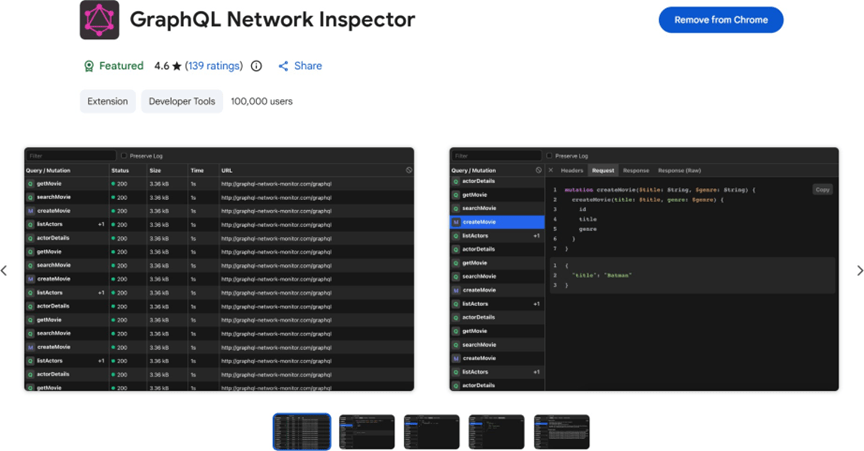
Step 2: Log in and navigate to the Tasks section Open your Ataccama ONE instance in the browser — sign in with your credentials.
Once inside, open DevTools and click the GraphQL Network tab that the extension has injected. Then navigate to Monitoring → Tasks inside Ataccama’s UI.
As the task list loads, the extension automatically captures every GraphQL request in the background — you do not need to do anything else at this stage.
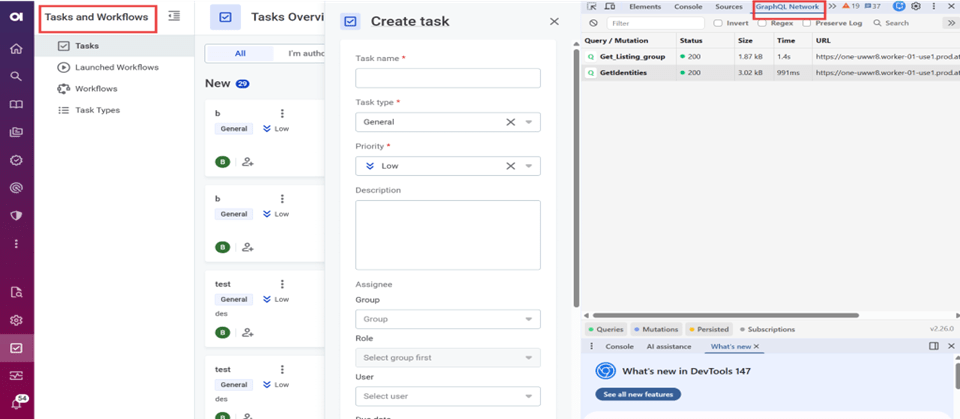
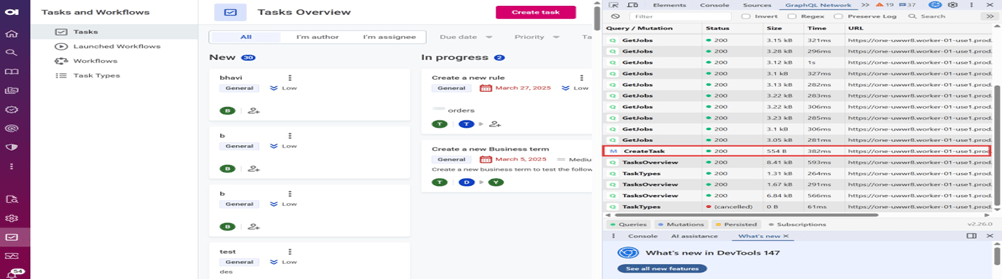
Step 3: In the GraphQL Network Inspector panel, you will see a list of intercepted requests appear as the Tasks page loads. Look for an entry named something like tasks, getTasks, or listTasks.
Click on that request. The extension will display three panels:
Query — the exact GraphQL query string Ataccama’s UI is sending
Variables — any filters, pagination, or sorting parameters sent with the query
Headers — including the Authorization: Bearer … token you will need for authentication
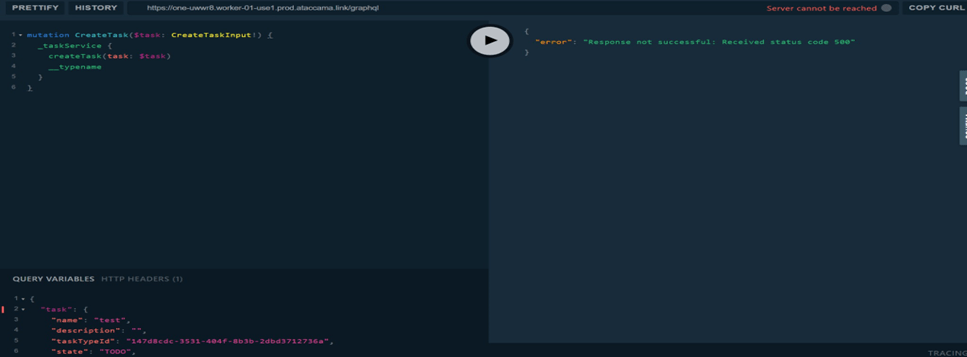
Open a GraphQL playground and paste the query
Open the playground URL this opens the GraphQL Client playground in a new tab or side panel.
Configure with the following:
Set the endpoint URL to https://yourcompany.ataccama.com/playground
Paste the captured query into the query editor on the left
Open the Variables panel and paste any variables captured from the extension
Add the authorization in the headers section
Conclusion
Retrieving tasks using the Ataccama GraphQL API is faster and more efficient than it may seem. By combining a GraphQL network inspector Chrome extension with a playground, you can go from zero to a working API request in minutes.
This approach eliminates guesswork, speeds up development, and makes your enterprise data governance tools easier to integrate and maintain as your operations grow.
Categories
- Accessibility solutions (3)
- AI / LLMOps (AI Observability & Monitoring) (3)
- AI & Automation (17)
- AI Governance & Responsible AI (4)
- AI Security (4)
- Android (17)
- Angular JS (1)
- API & Integration / Developer Tools (1)
- Apple (3)
- Artificial Intelligence (1)
- Artificial Intelligence (AI) (16)
- AV & Collaboration Technology (2)
- AWS Cloud Computing (2)
- AWS DMS (6)
- AWS RDS (12)
- Azure (3)
- BI & ANALYTICS (16)
- Cloud Computing & AI (5)
- Cloud Identity & Directory Services (1)
- Cloud Migration (12)
- Cloud Security & Identity Management (3)
- Company News (5)
- Continuous integration and continuous deployment (2)
- Cybersecurity (7)
- Data Analytics (12)
- Data Engineering (8)
- Data Governance & Compliance (6)
- Data Management (5)
- Data Migration (9)
- Data Quality (1)
- Data Quality & Data Governance (1)
- DBA (10)
- DevOps (1)
- Email Security (1)
- Endpoint Management / Device Management (1)
- Enterprise AI / AI Governance (1)
- Enterprise AI / AI Implementation Best Practices (1)
- Enterprise AI & Intelligent Automation (2)
- Enterprise Mobility & Security (1)
- Enterprise Software Integration / Backend Development (1)
- Enterprise Technology (1)
- Enterprise UX/UI Design (1)
- Goldengate (19)
- Google (2)
- Hadoop (3)
- HPNA (1)
- Ios (10)
- ios 10 (2)
- iPad (3)
- iPhone (3)
- Licensing (7)
- Linux (13)
- Machine Learning Solutions (1)
- Marketing Technology (1)
- Microsoft 365 (1)
- Microsoft 365 Development / APIs (1)
- Microsoft 365 Security & Compliance (4)
- Microsoft Configuration Manager (SCCM / MECM) (1)
- Microsoft Dynamics 365 (4)
- Microsoft Marketplace (1)
- Microsoft Office (5)
- Microsoft Purview (3)
- Microsoft SharePoint & Security (1)
- Microsoft Teams / Collaboration Tools (1)
- Microsoft Teams Security & Compliance (2)
- Mobile (2)
- Network Automation (5)
- Network Security Services (1)
- News (21)
- Operating System (1)
- Oracle (37)
- oracle consulting (3)
- PostgreSQL (1)
- Quantum Computing (1)
- Quickbooks (1)
- SEO (1)
- Software Development (33)
- Systems Automation (2)
- Tech (3)
- Technology (51)
- UI (13)
- Uncategorized (8)
- UX (9)
- VSTO (1)
- Web Development (1)
- Windows (9)
- wordpress (1)