

Ataccama Custom Task Types & Task Board Guide (Step-by-Step)
What is the Ataccama Task Board?
The Ataccama task board is a kanban-style interface that helps teams manage data governance tasks efficiently. It displays all tasks as cards organized into three stages — To Do, In Progress, and Done.
Each card highlights key details such as task name, task type, priority, and the linked data asset, making task management in data governance more structured and transparent.
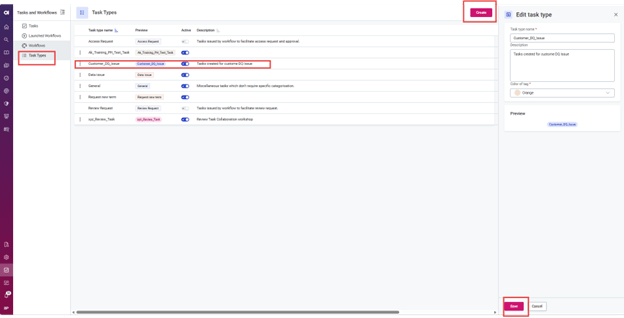
You can access the task board from the left navigation panel under Tasks and Workflows → Tasks. The platform also allows filtering by task type, priority, due date, author, or assignee. Whether you want to view all tasks, assigned tasks, or created tasks, the Ataccama workflow management system keeps everything organized in one place.
create a custom task type:
A custom task type lets you label tasks specifically for your datasets or processes rather than using generic types. Here is how to create one.
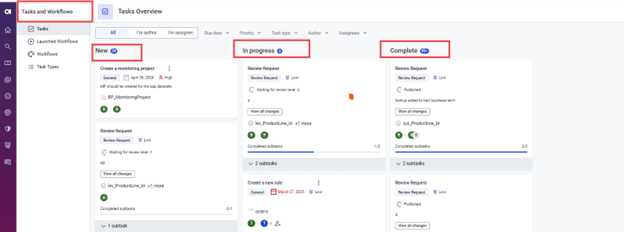
- Go to Tasks and Workflows → Task Types in the left navigation panel.
- . Click Create task type.
- Give it a name that matches your dataset or process — for example, Customer DQ Review or Orders Data Check
- Add a description so other team members understand what this type is for.
- Save. Your new type now appears in the task type list and in the dropdown when creating tasks.
create a task using custom type:
Once your custom task type exists, you can attach it to any task you create.
- Go to Tasks and Workflows → Tasks and click Create task.
- In the task type dropdown, select your custom type.
- Fill in the task name, description, priority (Low / Medium / High), and assignee.
- Set the Entity type — for example, Catalog item — and then pick the specific dataset in the Instance field. This links the task directly to that data asset.
- Optionally set a due date and add subtasks to split the work across team members.
- Click Create. The task card appears on the board under the To do column and the assignee gets a notification.
Conclusion
The Ataccama task board offers a clear and centralized way to manage data governance tasks. By using custom task types in Ataccama, organizations can organize work more effectively, improve traceability, and ensure every dataset-related task is easy to track and act on.
If you’re looking to improve task management in data governance, implementing structured workflows in Ataccama ONE is a practical and scalable approach.
Categories
- Accessibility solutions (3)
- AI / LLMOps (AI Observability & Monitoring) (3)
- AI & Automation (17)
- AI Governance & Responsible AI (4)
- AI Security (4)
- Android (17)
- Angular JS (1)
- API & Integration / Developer Tools (1)
- Apple (3)
- Artificial Intelligence (1)
- Artificial Intelligence (AI) (16)
- AV & Collaboration Technology (2)
- AWS Cloud Computing (2)
- AWS DMS (6)
- AWS RDS (12)
- Azure (3)
- BI & ANALYTICS (16)
- Cloud Computing & AI (5)
- Cloud Identity & Directory Services (1)
- Cloud Migration (12)
- Cloud Security & Identity Management (3)
- Company News (5)
- Continuous integration and continuous deployment (2)
- Cybersecurity (7)
- Data Analytics (12)
- Data Engineering (8)
- Data Governance & Compliance (6)
- Data Management (5)
- Data Migration (9)
- Data Quality (1)
- Data Quality & Data Governance (1)
- DBA (10)
- DevOps (1)
- Email Security (1)
- Endpoint Management / Device Management (1)
- Enterprise AI / AI Governance (1)
- Enterprise AI / AI Implementation Best Practices (1)
- Enterprise AI & Intelligent Automation (2)
- Enterprise Mobility & Security (1)
- Enterprise Software Integration / Backend Development (1)
- Enterprise Technology (1)
- Enterprise UX/UI Design (1)
- Goldengate (19)
- Google (2)
- Hadoop (3)
- HPNA (1)
- Ios (10)
- ios 10 (2)
- iPad (3)
- iPhone (3)
- Licensing (7)
- Linux (13)
- Machine Learning Solutions (1)
- Marketing Technology (1)
- Microsoft 365 (1)
- Microsoft 365 Development / APIs (1)
- Microsoft 365 Security & Compliance (4)
- Microsoft Configuration Manager (SCCM / MECM) (1)
- Microsoft Dynamics 365 (4)
- Microsoft Marketplace (1)
- Microsoft Office (5)
- Microsoft Purview (3)
- Microsoft SharePoint & Security (1)
- Microsoft Teams / Collaboration Tools (1)
- Microsoft Teams Security & Compliance (2)
- Mobile (2)
- Network Automation (5)
- Network Security Services (1)
- News (21)
- Operating System (1)
- Oracle (37)
- oracle consulting (3)
- PostgreSQL (1)
- Quantum Computing (1)
- Quickbooks (1)
- SEO (1)
- Software Development (33)
- Systems Automation (2)
- Tech (3)
- Technology (51)
- UI (13)
- Uncategorized (8)
- UX (9)
- VSTO (1)
- Web Development (1)
- Windows (9)
- wordpress (1)